
The Jaqw virus is a member of the STOP/DJVU ransomware family. Its primary purpose is to encrypt user files and demand a ransom for their decryption. When the Jaqw virus runs in a system, it scans for various file types, usually videos, photos, documents, and more. It then ciphers these files using a strong encryption algorithm. Attacked files can be identified by the “.jaoy” extension at the end.
Jaqw Virus Overview
Jaqw
🤔 Jaqw malware belongs to ransomware that belongs to the DJVU/STOP ransomware family. Its main target is to encrypt all of your files it can reach. After that this ransomware asks its victims for a ransom payment – ($490 – $980) in Bitcoin.
The Jaqw virus is a malware type that encrypts your files and forces you to pay for their recovery. This ransomware ciphers a wide selection of file types. ciphered files can be identified by a distinct “.jaqw” extension. The files touched by ransomware become impossible to access and use.
Then, the ransomware asks for a ransom payment in Bitcoin from the victims, ranging from $490 to $980. In all cases, a ransom text file is named as “_readme.txt“.
Jaqw Ransomware works with Salsa20 encryption algorithms to scramble the contents of the targeted files. Since Jaqw virus uses such a strong ciphering method, it becomes quite difficult, if even possible, to find the decryption key without the assistance of the attackers.
Once Jaqw malware finishes the encryption, it shows a ransom note to the victim, asking for a ransom payment for the decryption key. The ransom note contains instructions on how to pay off the bill and often contains threats of permanent data loss or ransom amounts surge if the ransom is not paid within a specified timeframe.
I have compiled a comprehensive list of potential solutions, advice, and methods to remove the Jaqw virus and decrypt your files. There are situations where it may be possible to restore your files, but sometimes, it may be impossible.
📌 Important Reminder!
Emphasizing that paying the ransom does not ensure the successful recovery of files is crucial. The individuals responsible for the Jaqw virus cannot be relied upon. There have been cases in which ransom payments were made, only to be rejected by the cybercriminals, who refused to provide the decryption key.
Jaqw uses a unique key for every victim, with one exception:
The Jaqw virus bears resemblance to other DJVU ransomware variants such as Jasa, Jaoy, Taqw, and Tasa. This virus encrypts a wide range of common file types and appends its distinct “.jaqw” extension to all files. For instance, a file named “1.jpg” would be altered to “1.jpg.jaqw” and “2.png” to “2.png.jaqw“.
Upon successful encryption, the virus creates a special text file named “_readme.txt” and places it in every folder containing the encrypted files. It as well adds the readme file to the desktop, so the victim will not miss the attack even without opening folders.
The image below provides a visual representation of files with the “jaqw” extension:
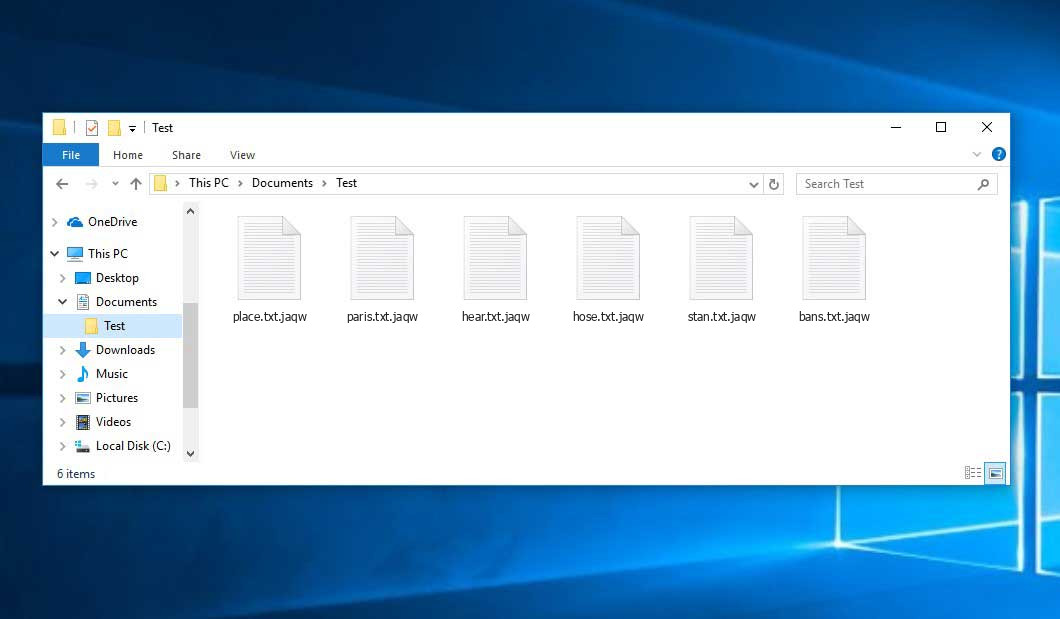
Encrypted Files by STOP/DJVU Ransomware
| Name | Jaqw Virus |
| Ransomware family1 | DJVU/STOP2 ransomware |
| Extension | .jaqw |
| Ransomware note | _readme.txt |
| Ransom | From $490 to $980 (in Bitcoins) |
| Contact | [email protected], [email protected] |
| Detection | VirTool:Win32/CeeInject!KC, Trojan-Ransom.Win32.Blocker.ikgf, Win32/Filecoder.Spacecolon.A |
| Symptoms |
|
| Fix Tool |
To remove possible malware infections, scan your PC:
6-day free trial available. |
This message asking payment is for restore files via decryption key:
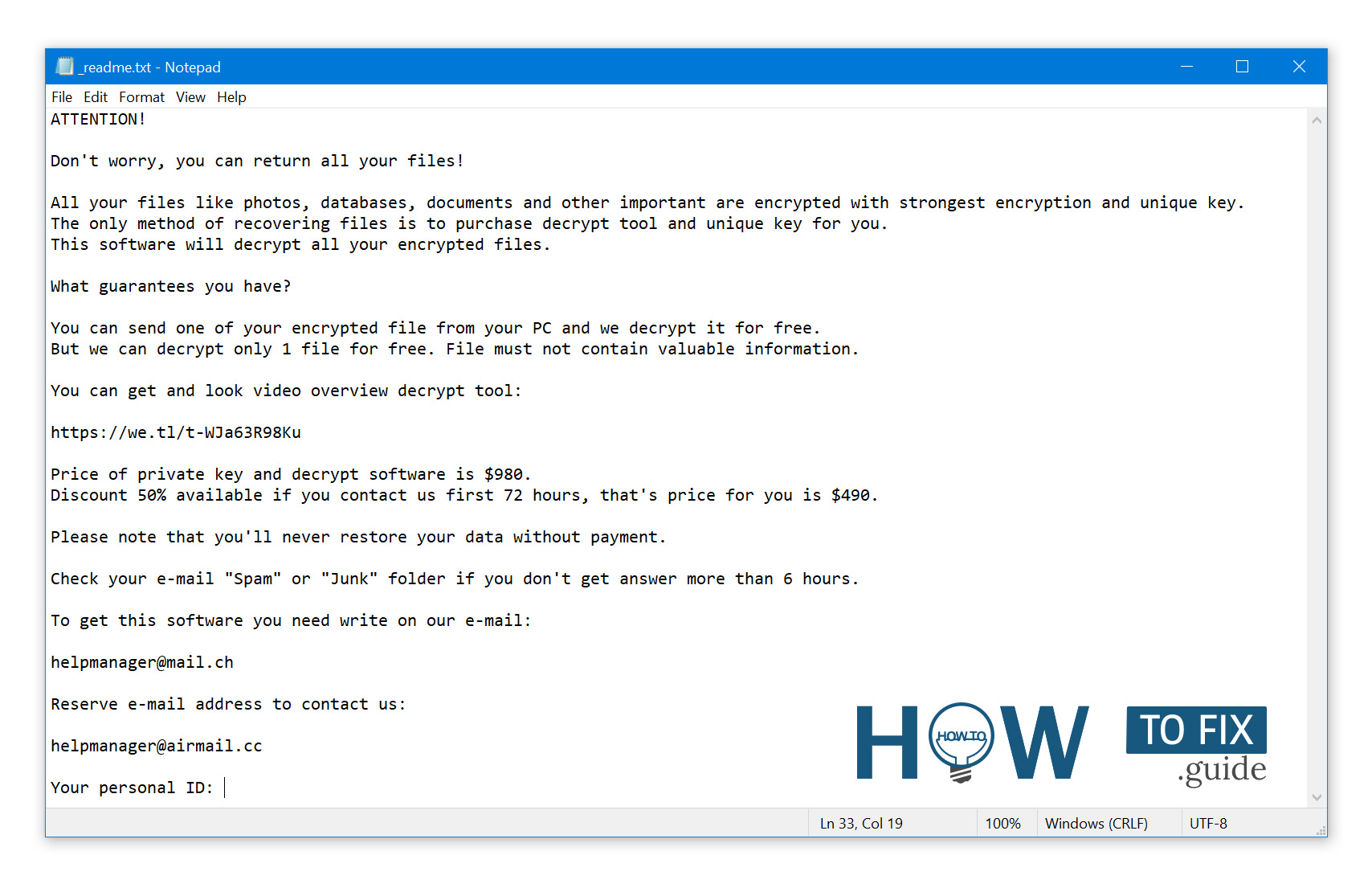
The _readme.txt (STOP/DJVU Ransomware) – The frightening alert demanding users to pay the ransom to unlock the encoded data contains these annoying cautions.
The Jaqw ransomware operates by executing various activities on a victim’s computer. One of the initial actions it takes is launching winupdate.exe, a deceptive process that displays a fraudulent Windows update alert as part of the attack. This action aims to convince the victim that their PC’s slowdown is due to a Windows update.
Concurrently, the ransomware initiates another process (usually named with 4 random characters) to scan the computer for target files and encrypt them. Subsequently, the ransomware eliminates Volume Shadow Copies from the system using the following CMD command:
vssadmin.exe Delete Shadows /All /Quiet
Once removed, the ability to restore the previous computer state using System Restore Points becomes significantly challenging. The problem lies in the fact that ransomware operators eliminate any built-in Windows methods that could help victims restore their files without payment. Furthermore, the hackers modify the Windows HOSTS file by appending a list of domains and mapping them to the localhost IP address. Consequently, attempting to access any of the blacklisted websites results in a DNS_PROBE_FINISHED_NXDOMAIN error.
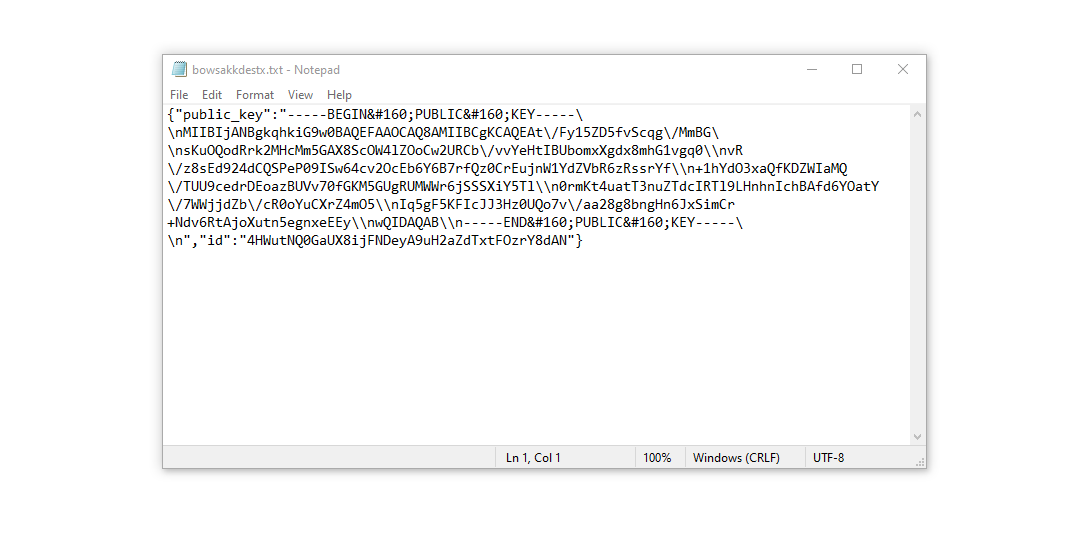
We have observed that the ransomware actively blocks websites that provide various how-to guides for computer users. This action clearly indicates that by restricting access to specific domains, the malicious actors intend to hinder victims from obtaining relevant and helpful information related to ransomware attacks. Additionally, the malware creates two .txt files on the victim’s computer containing attack-related information – the victim’s public encryption key and personal ID. These files are named bowsakkdestx.txt and PersonalID.txt.
After all these modifications, the malware doesn’t cease. Variants of STOP/DJVU are inclined to deploy Vidar password-stealing Trojan on compromised systems. This threat has an large list of capabilities, including:
- Gathering sensitive data by running malicious software on the victim’s computer.
- Acquiring unauthorized login credentials of Steam, Telegram, and Skype accounts.
- Manipulating and viewing files on the victim’s computer without their knowledge.
- Stealing cryptocurrency wallets from the victim’s system.
- Granting the hackers remote control over the victim’s computer for various malicious activities.
- Extracting sensitive information such as browser cookies, saved passwords, and browsing history.
The encryption algorithm in STOP/Djvu ransomware is AES-256. So, if your data got encrypted with an online decryption key, the chances to get your files back without paying the ransom are quite low. Thing is, this key is unique for each victim, and picking it will take too much time.
Retrieving the online key in any other way is also merely impossible. It is stored on a server owned by the crooks who promote the Jaqw infection. For receiving decryption key the payment should be $980. To obtain the payment details, the victims should contact the hackers by email ([email protected]).
The message by the ransomware states the following information:
ATTENTION!

Don't worry, you can return all your files!

All your files like photos, databases, documents and other important are encrypted with strongest encryption and unique key.
The only method of recovering files is to purchase decrypt tool and unique key for you.
This software will decrypt all your encrypted files.

What guarantees you have?

You can send one of your encrypted file from your PC and we decrypt it for free.
But we can decrypt only 1 file for free. File must not contain valuable information.

You can get and look video overview decrypt tool:

https://we.tl/t-WJa63R98Ku

Price of private key and decrypt software is $980.
Discount 50% available if you contact us first 72 hours, that's price for you is $490.

Please note that you'll never restore your data without payment.

Check your e-mail "Spam" or "Junk" folder if you don't get answer more than 6 hours.

To get this software you need write on our e-mail:

[email protected]

Reserve e-mail address to contact us:

[email protected]

Your personal ID:
XXXXXXXXXXXXXXXXXXXXXXXXXXXXXXX
Do not pay the ransom!
Please, try to use the available backups, or Decrypter tool
The _readme.txt file also outlines a requirement for system owners to establish contact with the hackers’ representatives within 72 hours of file encryption. By reaching out during this window, the hackers offer a 50% discount, effectively reducing the ransom amount to $490.
However, it’s imperative to resist the urge to pay the ransom! I strongly advise against engaging with these malicious actors and making any payments. A more effective approach to recovering lost data involves utilizing existing backups or employing the Decrypter tool provided by Emsisoft.
What sets this malware apart is its consistent approach to generating decryption keys. Consequently, unless the ransomware is still in developmental stages or employs exceptionally elusive encryption methods, manual data recovery is not feasible. The primary strategy to thwart data loss is to routinely create backups of critical files.
Remember, even if you diligently maintain backups, it’s crucial to store them in a designated location separate from your main workstation. For example, you can store backups on a USB flash drive or an external hard drive that isn’t consistently connected. Alternatively, you can consider utilizing online (cloud) storage solutions.
Of course, it’s evident that if you store your backup data on your primary device, it might end up encrypted alongside your files. Consequently, keeping backups on your main computer is a less than prudent decision.
How I was infected?
Ransomware has a various methods to built into your system. But it doesn’t really matter what way had place in your case.
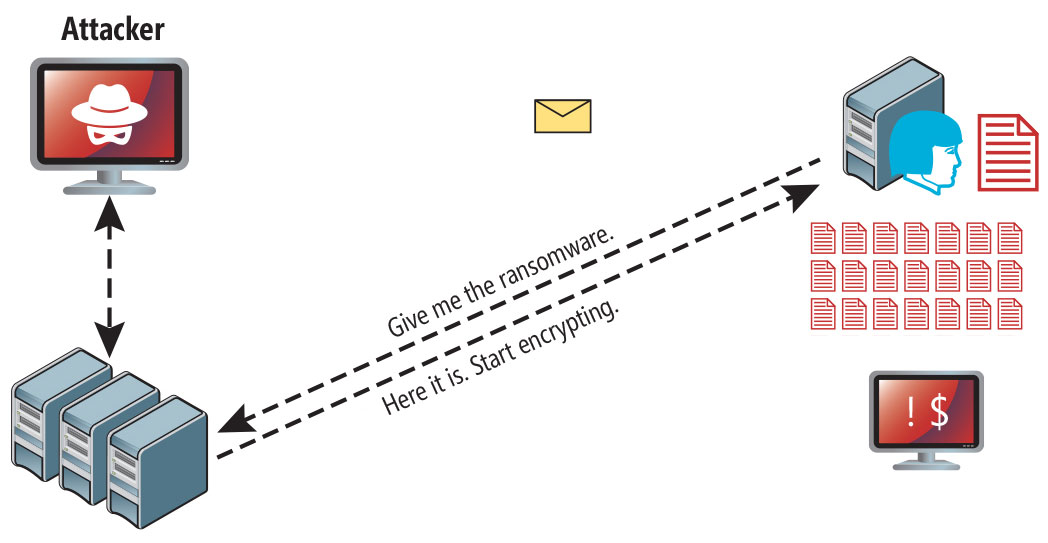
Ransomware attack following a successful phishing attempt.
However, there are common vulnerabilities through which it can infiltrate your PC:
- Utilizing online free hosting resources to discreetly distribute the virus.
- Embedding the virus installer within other applications, especially utilities presented as freeware or shareware.
- Spreading through spam emails containing questionable links that lead to virus installation.
- Acquiring pirated software from illegal peer-to-peer (P2P) sources, which might include concealed malware.
Instances have occurred where the Jaqw virus disguises itself as something legitimate, such as messages prompting you to run a browser update or install a critical codec for online media playback. This is often the tactic used by online scams to manipulate you into manually installing the ransomware, making you an unwitting participant in the process.
Certainly, the deceptive update notification won’t indicate that you’re installing a threat. This activity will be veiled under an alert insisting on the installation of an urgent security update or some seemingly innocuous program.
Undoubtedly, cracked applications also pose a risk. Utilizing P2P networks for illegal downloads can result in the introduction of severe malware, including the Jaqw ransomware.
In summary, how can you protect your PC from ransomware infiltration? While there’s no foolproof method to guarantee your PC’s safety, here are some recommendations to fortify defenses against Jaqw’s intrusion. Exercise caution when installing free software.
Always scrutinize the additional offerings presented by the installer apart from the primary free program. Steer clear of opening attachments from suspicious emails. Refrain from opening files from unknown senders. Naturally, keep your current anti-malware software up-to-date.
The malware doesn’t openly reveal itself. It won’t appear in your list of available programs. Instead, it operates discreetly under the guise of a malicious process running in the background, initiating as soon as you boot up your computer.
How To Remove Ransomware?
Video Guide
How To Decrypt .jaqw Files?
How to restore big files?
Try removing .jaqw extension on a few big files and opening them. This malware has issues with large files encryption. Either the virus read and did not lock the file, or it bugged and did not add the filemarker. If your files are very large (2GB+), the latter is most likely. Please, let me know in comments if that will work for you.
The newest extensions released around the end of August 2019 after the criminals made changes. This includes Jasa, Jaoy, Taqw etc.
As a outcome of the changes made by the criminals, STOPDecrypter is no longer supported. It has been replaced with the Emsisoft Decryptor for STOP Djvu Ransomware developed by Emsisoft.
You can download free decryption tool here: Decryptor for STOP Djvu.
-
Select folders for decryption.
Based on the default configurations, the decryptor will automatically choose the available directories in order to decode the currently reachable drives (the connected ones), including the network drives. Additional (optional) locations can be selected with the help of the “Add” button.
Decryptors usually propose several options considering the specific malware family. The present possible options are presented in the Options tab and can be activated or disabled there. You may locate a comprehensive list of the currently active Options below.
-
Click on the “Decrypt” button.
As soon as you add all the desired locations for decryption into the list, click on the “Decrypt” button in order to initiate the decryption procedure.
Note that the main screen may turn you to a status view, letting you know of the active process and the decryption statistics of your data:
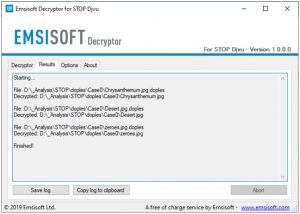
The decryptor will notify you as soon as the decryption procedure is completed. If you need the report for your personal papers, you can save it by choosing the “Save log” button. Note that it is also possible to copy it directly to your clipboard and to paste it into emails or messages here if you need to do so.
The Emsisoft Decryptor might display different messages after a failed attempt to restore your files:
✓ Error: Unable to decrypt file with ID: [your ID]
✓ No key for New Variant online ID: [your ID]
Notice: this ID appears to be an online ID, decryption is impossible
✓ Result: No key for new variant offline ID: [example ID]
This ID appears be an offline ID. Decryption may be possible in the future.
It can take a few weeks or months until the decryption key gets found and uploaded to the decryptor. Please follow updates regarding the decryptable DJVU versions here.
✓ Remote name could not be resolved
How to Restore .jaqw Files?
In some case ransomware is not doom for your files…
The Jaqw ransomware encryption mechanism sequence is next: it ciphers every file byte-by-byte, then saves a file copy, deleting (not overriding!) the original file. Thus, the data of the file placement on the disk drive is lost, but the original file is not deleted from the drive. The cell, or the sector where this file was stored, can still hold this file, but it is not present in the file system and can be overwritten by data that has been loaded to this disk after the removal. Hence, it is possible to retrieve your files using special software.
Regardless, once I grasped that the encryption was carried out by an online algorithm, the prospects of recovering my encrypted files appeared grim. The setback was exacerbated when I discovered that even my backup drive, which had been connected during the virus episode, appeared to have fallen victim. Each folder within the backup drive had been compromised and subjected to encryption. While some significant files were lost, a glimmer of optimism emerged as I managed to salvage nearly 80% of my expansive 2TB storage.
Upon delving into the folders, a consistent pattern emerged — the presence of a readme.txt ransom note within each one. Upon further exploration, it became evident that files residing directly within the folders had been encrypted, while a remarkable exception arose when I entered subfolders nested within those main folders. To my astonishment, files within these subfolders remained unscathed. While the entirety of my c and d drives, encompassing both main folders and subfolders, experienced encryption, the backup drive proved to be a unique case. The strategic organization of subfolders within folders ultimately safeguarded 80% of my cherished data.
Let it be noted, however, that I perceive this as a limited vulnerability applicable only to a backup drive. Moreover, my quest for recovery yielded a further 10% of my data residing on an alternative hard drive within a distinct computer. Hence, I extend this piece of advice: if you employ a backup drive, establish a hierarchy of subfolders. In retrospect, luck was undoubtedly a factor in my story. Conversely, misfortune struck as the virus infiltrated precisely during the transfer of files from my backup drive.
Hopefully, this can help some other people in my situation.
Jamie Newland- It has been observed that certain variations of the STOP/DJVU ransomware might not encrypt folders nested deeply. You could verify this by checking if such folders remain unencrypted.
- This particular ransomware strain first saves the encrypted data to a new file and subsequently deletes the original. As a result, there exists a slight possibility that a portion of the deleted file can be restored using file recovery software. Although restoring the folder structure is unlikely, tools like PhotoRec, available for free, could prove to be effective.
- The encryption carried out by this ransomware is partial, encompassing only the initial 150 KB of data. Depending on the size of the file and the nature of the data, it is conceivable that the unencrypted segment can be recuperated.
Recovering your files with PhotoRec
Originally designed for recovering files from damaged disks or accidental deletions, PhotoRec is a free program that has evolved over time to support the restoration of files across 400 different file types. This makes it a suitable option for recovering files following a Jaqw ransomware attack.
To get started, you’ll need to download PhotoRec. While the program is completely free, the developer doesn’t guarantee file restoration. PhotoRec is packaged alongside another program from the same developer called TestDisk. The downloaded archive will be labeled as TestDisk, but don’t worry, the PhotoRec files are contained within.
Running PhotoRec is simple. Locate and open the file named “qphotorec_win.exe”. The program doesn’t require installation as it carries all the necessary files within the archive. This means you can place it on a USB drive and use it to assist anyone, such as friends, family, or others who have fallen victim to the Jaqw ransomware.
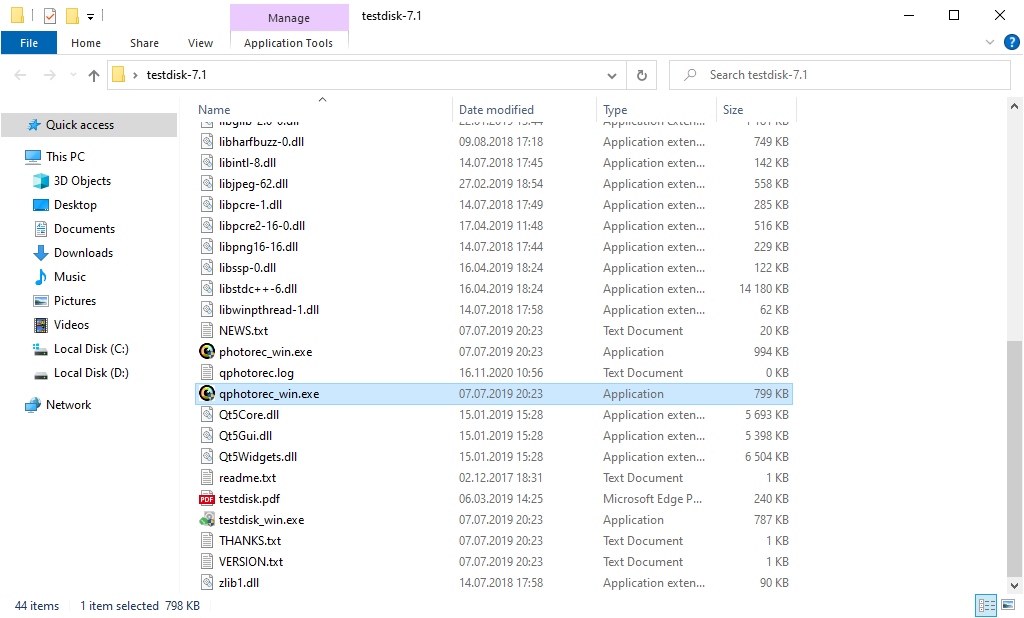
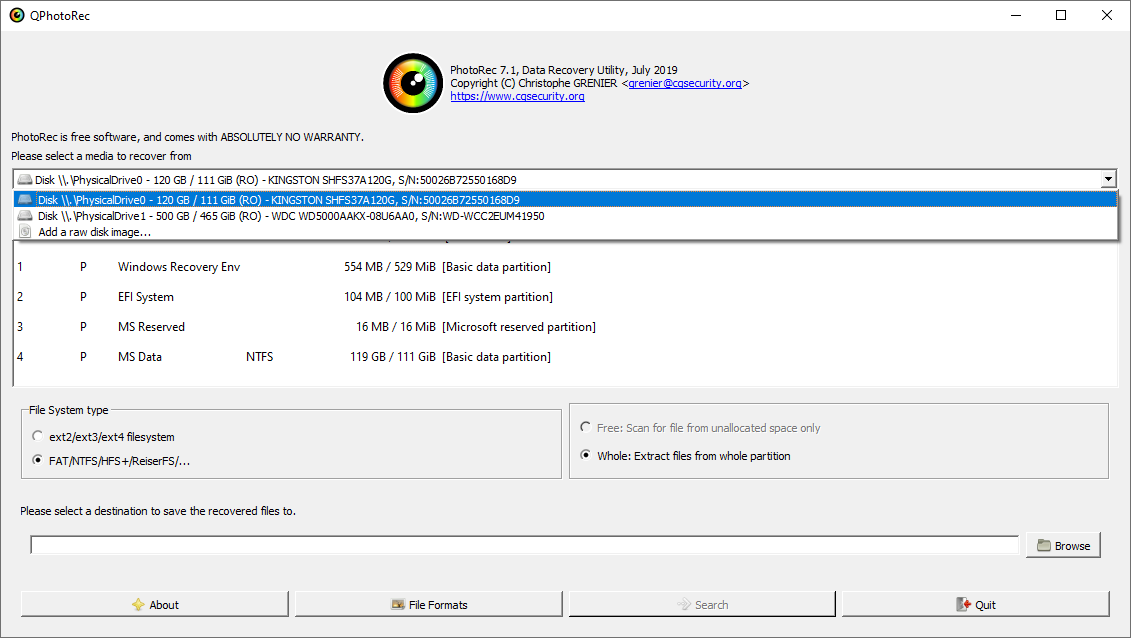
After the start, you will observe the screen showing you the complete list of your disks. However, this details are presumably useless, because the required menu is placed a bit higher. Click this tab, then choose the disk which was attacked by ransomware.
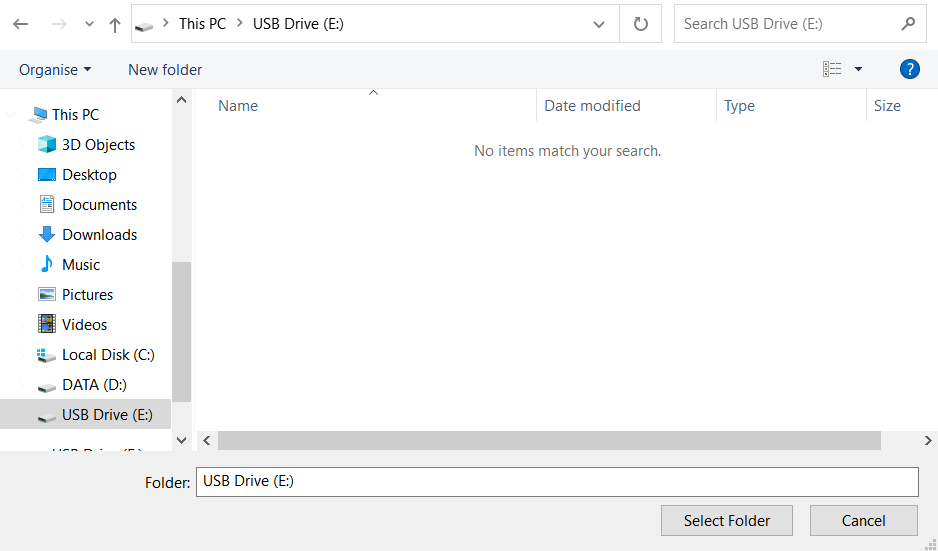
After opting for the disk, you need to choose the destination folder for the retrieved files. This menu is located at the lower part of the PhotoRec window. The best selection is to export them on USB drive or any other type of removable disk.
Then, you need to specify the file formats. This choice is located at the bottom, too. As it was mentioned, PhotoRec can restore the files of about 400 different formats.
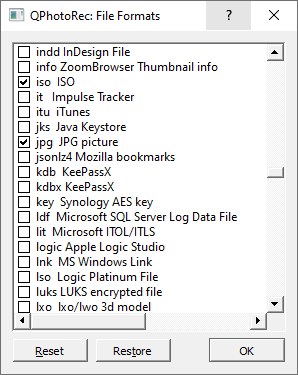
Finally, you can initiate files restoration by pressing the “Search” button. You will view the screen where the outcomes of the scan and recovery are shown.
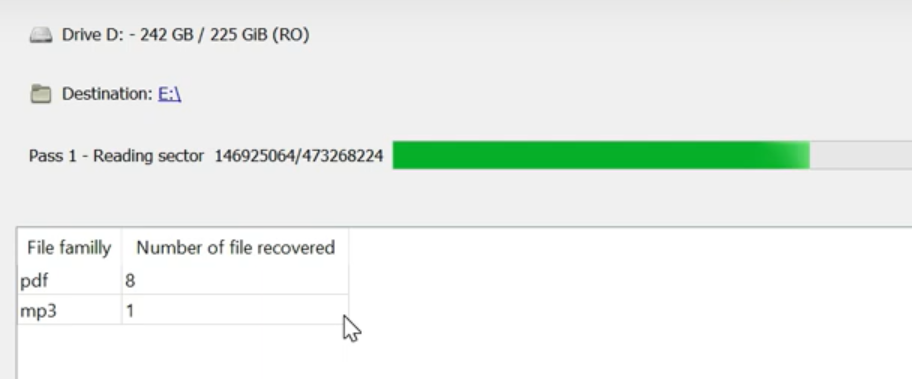
Jaqw files recovery Video Guide.
Frequently Asked Questions
I need your help to share this article.
It is your turn to help other people. I have written this guide to help people like you. You can use buttons below to share this on your favorite social media Facebook, Twitter, or Reddit.
Brendan SmithReferences
 German
  Japanese
  Spanish
  Portuguese (Brazil)
  French
  Turkish
  Chinese (Traditional)
  Korean
  Indonesian
  Hindi
Hindi  Italian


Leave a Comment