
The “Google Safe Browser Total Protection” scam, widely disseminated through deceptive websites, falsely presents itself as a Google security tool. Upon entry, it simulates a system scan, reporting non-existent threats and potential dangers. This scam primarily spreads through deceptive content to promote harmful software, including fake anti-viruses and malware.
Additionally, “Google Safe Browser Total Protection” scam may redirect users to official websites, exploiting affiliate programs for illicit gains. It also solicits permission for browser notifications to endorse unreliable software. Falling for this scam can result in system infections, privacy breaches, financial loss, and identity theft. Stay cautious when encountering such deceptive schemes.
“Google Safe Browser Total Protection” Scam Overview
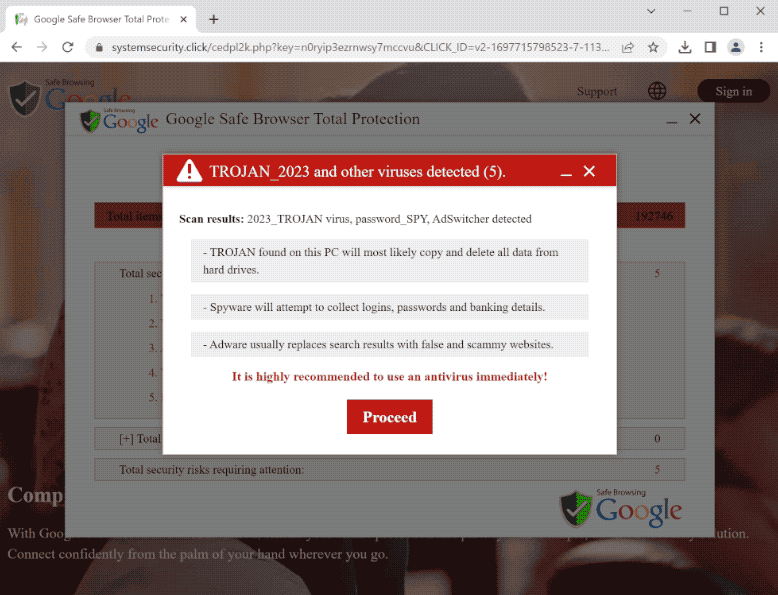
Screenshot of scam notification
It is worth noting that, at the time of research, the page running “Google Safe Browser Total Protection” requested permission to deliver browser notifications. These advertisements primarily endorse online scams, unreliable/hazardous software, and even malware. By trusting a scam like “Google Safe Browser Total Protection”, users may experience system infections, serious privacy issues, financial losses, and identity theft.
| Name | “Google Safe Browser Total Protection” Scam |
| Threat Type | Phishing, Scam, Social Engineering, Fraud |
| Serving IP Address (systemsecurity[.]click) | 148.251.151.251 |
| Distribution methods | Compromised websites, rogue online pop-up ads, potentially unwanted applications. |
| Similar Behavior | “Avast – Your PC Is Infected With 5 Viruses!”, “Virus Has Been Detected On Your Device”, “Your Account Is Successfully Debited”, “Your Windows 10 is infected with viruses” |
| Damage | Loss of sensitive private information, monetary loss, identity theft, possible malware infections. |
How does “Google Safe Browser Total Protection” Scam works?
Upon entering a website promoting the “Google Safe Browser Total Protection” scam, visitors encounter a fabricated system scan. This faux scan purportedly identifies multiple viruses and adware on their device. Subsequently, the scam presents a pop-up notification detailing non-existent issues and the supposed threats they pose. As previously highlighted, all assertions made by “Google Safe Browser Total Protection” are entirely baseless, and this scam bears no connection to Google or any of its products or services. It’s essential to be aware that no website possesses the capability to conduct system scans or detect threats on visitors’ devices.
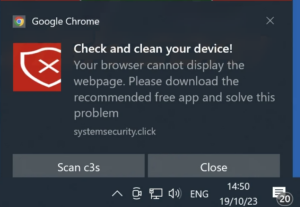
Google Chrome scam notification
It is pertinent to note that such scams may redirect users to the official websites of genuine products or services. In these cases, scammers exploit affiliate programs to illicitly earn commissions by promoting these products.
How serious is this?
The “Google Safe Browser Total Protection” scam is a highly serious and malicious online threat. It preys on users’ trust in the Google brand and employs various deceptive tactics to mislead and defraud individuals.
The seriousness of this scam is highlighted by several key factors:
- It operates through deceitful websites that closely mimic trusted sources, making it challenging for users to distinguish the scam from legitimate content.
- The scam fabricates threats and dangers on users’ devices, causing unnecessary panic and fear.
- The primary objective of the scam is to promote harmful software, which can lead to real-world consequences, including system infections, privacy breaches, financial losses, and even identity theft.
- In some cases, the scam leverages legitimate affiliate programs to earn illicit commissions, further contributing to its malicious intent.
Given these factors, it’s essential to treat this scam with utmost seriousness and exercise caution when encountering any suspicious content online to safeguard against potential harm and deception.


Leave a Comment