
The “Error Code: W9KA528V” pop-up scam masquerades as a dire warning from Microsoft Windows, falsely claiming system blockage due to security concerns. It aims to deceive users into calling a fake support line.
Cybercriminals then exploit this ruse to gain remote access to victims’ devices, disable security tools, and harvest sensitive data. These scams often emerge due to the lure of financial gain and exploit users’ trust in official support channels, underlining the need for vigilance against deceptive online tactics.
“Error Code: W9KA528V” Pop-Up Scam Overview
“Error Code: W9KA528V” is a classic fake tech support page, used by cybercriminals to fraud unaware users. This scam masquerades as a dire warning from Microsoft Windows, alleging that the user’s system has been blocked due to security concerns. The primary objective of this ruse is to dupe victims into dialing a fraudulent helpline.
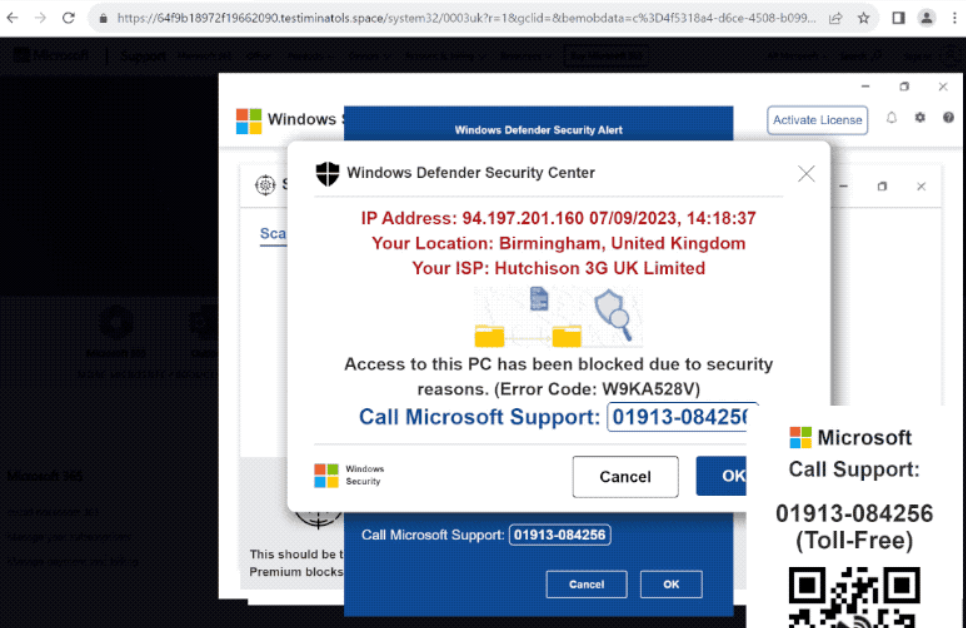
Browser window with the “Error Code: W9KA528V” pop-up scam
Upon visiting a webpage hosting the “Error Code: W9KA528V” scam, multiple pop-up windows are unleashed. These include a fictitious system scan purportedly conducted by Microsoft Defender Antivirus (a.k.a. “Windows Defender”). Fabricated threat reports flood the screen, falsely alarming the user about non-existent dangers. The foremost pop-up asserts that device access has been restricted due to security issues, coercing the user to call the provided support line. It’s crucial to underscore that all these claims are entirely fabricated, and this deceptive content bears no affiliation with Windows or its developer, Microsoft.
| Name | Error Code: W9KA528V |
| Threat Type | Scam page |
| Description | False claims regarding blocking your PC, that force calling the fake tech support |
| Associated domains | testiminatols[.]space |
| Phone number | 01913-084256 |
| Similar behavior | Error Code: 0x80073b01, Virus Has Been Detected On Your Device, Ads.fiancetrack(2).dll |
How Does “Error Code: W9KA528V” Pop-Up Scam Work?
Upon gaining remote access, criminals can disable or remove security tools, install fake antivirus software, harvest sensitive data, and even introduce real malware into the system, including trojans, ransomware, and cryptominers. Victims might unknowingly divulge their private information over the phone or enter it into phishing files or websites. Data can also be siphoned off using information-stealing malware. Cybercriminals primarily target account login credentials, personally identifiable information, and financial data such as banking details and credit card numbers.
Furthermore, scammers often charge exorbitant fees for their supposed “services”. To evade detection and money retrieval, they prefer untraceable payment methods like cryptocurrencies, gift cards, prepaid vouchers, or concealed cash in packages shipped to them. Unfortunately, successfully scammed victims may find themselves targeted repeatedly. In summary, trusting a scam like “Error Code: W9KA528V” can lead to system infections, severe privacy breaches, financial losses, and even identity theft. It’s crucial to remain vigilant and avoid falling victim to these deceptive tactics.
“Error Code: W9KA528V” – How to Close?
If you find it impossible to close a scam page, use Windows Task Manager to terminate the browser’s process. When you reopen the browser, avoid restoring the previous browsing session to prevent the deceptive webpage from reopening. In case when cybercriminals have remotely accessed your device, take the following steps:
- Disconnect your device from the internet.
- Uninstall the remote access program the criminals used, as they may not need your consent to reconnect.
- Run a comprehensive system scan with an antivirus program to eliminate all detected threats.
If you suspect your login credentials have been exposed, change the passwords for all potentially compromised accounts and notify their official support. Once other private information, such as ID card details, passport photos/scans, or credit card numbers, is at risk, contact the appropriate authorities promptly. Swift action is crucial to mitigate potential harm from such incidents. I also recommend scanning your device with anti-malware software, that will detect potentially malicious items brought during the remote connection session.
How did that thing appear?
Deceptive websites often gain prominence through pages utilizing rogue advertising networks. These malicious websites can be forcibly opened upon accessing a rogue webpage or triggered by engaging with hosted content, such as clicking buttons, entering text in fields, interacting with ads, or clicking on links.
The endorsement of online scams is further facilitated by spam browser notifications and intrusive advertisements. Even a simple misspelling of a website’s URL can lead to redirection or trigger a redirection chain that ultimately lands users on deceptive pages. Moreover, adware can play a significant role in displaying scam-promoting ads or causing redirects to webpages hosting these fraudulent activities.


Leave a Comment