
The Nett virus belongs under the MedusaLocker ransomware family. A harmful program of this type encrypts all the data on your computer (images, text files, excel sheets, music, videos, etc) and adds its specific extension to every file, creating the Recovery_Instructions.html files in every directory with the encrypted files.
What is Nett virus?
Nett is a MedusaLocker family ransomware malicious agent. It will append its specific .nett extension to every file’s title. For instance, a file entitled “photo.jpg” will be turned into “photo.jpg.nett”. Likewise, the Excel table named “table.xlsx” will end up as “table.xlsx.nett”, and so on.
In each directory with the encoded files, a Recovery_Instructions.html file will be found. It is a ransom money note. It contains information on the ways of contacting the racketeers and some other remarks. The ransom note usually contains instructions on how to buy the decryption tool from the racketeers. That is basically the scheme of the felony.
Nett Summary:
| Name | Nett Virus |
| Ransomware family1 | MedusaLocker ransomware |
| Extension | .nett |
| Ransomware note | Recovery_Instructions.html |
| Detection | Trojan:Win32/Tnega!MSR Removal, Win32:Adware-DNA [Adw] Virus Removal, Win32:Secat [Trj] Virus Removal |
| Symptoms | Your files (photos, videos, documents) have a .nett extension and you can’t open them. |
| Fix Tool | See If Your System Has Been Affected by Nett virus |
The Recovery_Instructions.html file coming in package with the Nett ransomware states the following:
YOUR PERSONAL ID:
-
/! YOUR COMPANY NETWORK HAS BEEN PENETRATED /!
ALL YOUR IMPORTANT FILES HAVE BEEN ENCRYPTED!


YOUR FILES ARE SAFE! JUST MODIFIED ONLY. (RSA+AES)


ANY ATTEMPT TO RESTORE YOUR FILES WITH THIRD-PARTY SOFTWARE
WILL PERMENANTLY DESTROY YOUR FILE.
DO NOT MODIFY ENCRYPTED FILES. DO NOT RENAME ENCRYPTED FILES.


NO SOFTWARE AVAILABLE ON INTERNET CAN HELP YOU. WE ONLY HAVE
SOLUTION TO YOUR PROBLEM.


WE GATHERED HIGHLY CONFIDENTIAL/PERSORNAL DATA. THESE DATA
ARE CURRENTLY STORED ON A PRIVATE SERVER. THIS SERVER WILL BE
IMMEDIATELY DESTROYED AFTER YOUR PAYMENT. WE ONLY SEEK MONEY
AND DO NOT WANT TO DAMAGE YOUR REPUTATION. IF YOU DECIDE TO
NOT PAY, WE WILL RELEASE THIS DATA TO PUBLIC OR RE-SELLER.


YOU WILL CAN SEND US 2-3 NON-IMPORTANT FILES AND WE WILL
DECRYPT IT FOR FREE TO PROVE WE ARE ABLE TO GIVE YOUR FILES
BACK.


Contact us for price and get decryption software.
-
* Note that this server is available via Tor browser only


Follow the instructions to open the link:
1. Type the addres "hxxps://www.torproject.org" in your Internet browser. It opens the Tor site.
2. Press "Download Tor", then press "Download Tor Browser Bundle", install and run it.
3. Now you have Tor browser. In the Tor Browser open "URL".
4. Start a chat and follow the further instructions.


If you can't use the above link, use the email:
[email protected]
[email protected]


MAKE CONTACT AS SOON AS POSSIBLE. YOUR DECRYPTION KEY IS ONLY STORED
TEMPORARLY. IF YOU DON'T CONTACT US WITHIN 72 HOURS, PRICE WILL BE HIGHER.
In the image below, you can see what a directory with files encrypted by the Nett looks like. Each filename has the “.nett” extension added to it.
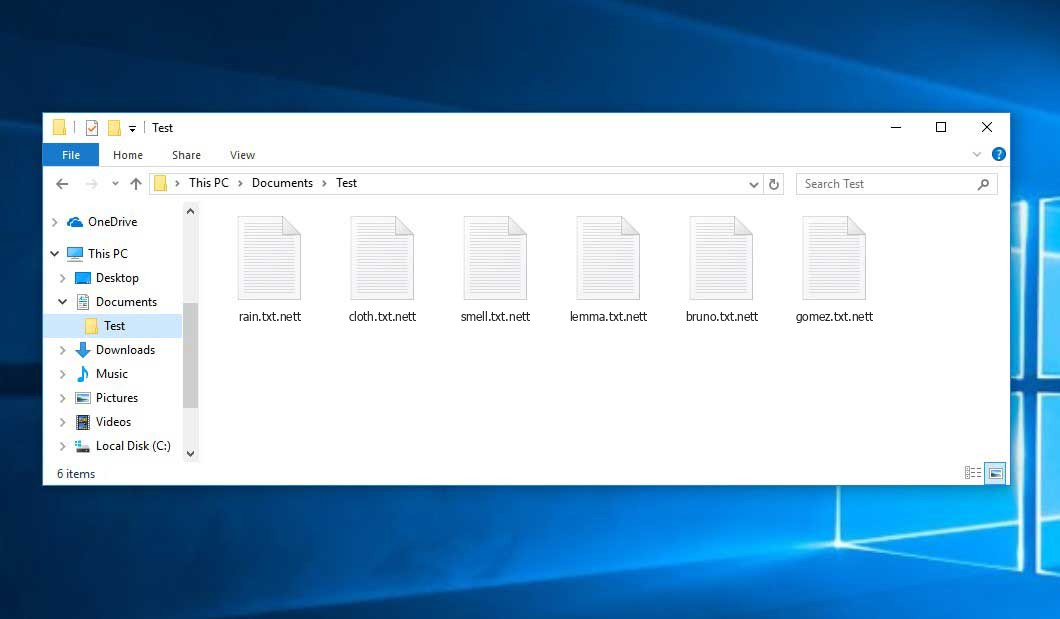
An example of encrypted .nett files.
How did Nett ransomware end up on my PC?
There are plenty of possible ways of ransomware infiltration.
There are currently three most popular methods for hackers to have the Nett virus planted in your digital environment. These are email spam, Trojan injection and peer-to-peer networks.
- Another thing the hackers might try is a Trojan virus scheme. A Trojan is a program that infiltrates into your machine disguised as something different. For instance, you download an installer of some program you need or an update for some service. But what is unpacked turns out to be a harmful program that encrypts your data. Since the installation package can have any name and any icon, you have to make sure that you can trust the source of the files you’re downloading. The optimal way is to trust the software developers’ official websites.
- As for the peer-to-peer networks like BitTorrent or eMule, the danger is that they are even more trust-based than the rest of the Web. You can never guess what you download until you get it. Our suggestion is that you use trustworthy resources. Also, it is reasonable to scan the directory containing the downloaded items with the antivirus as soon as the downloading is complete.
How do I get rid of ransomware?
It is important to note that besides encrypting your files, the Nett virus will probably install Vidar Stealer on your machine to seize your credentials to different accounts (including cryptocurrency wallets). The mentioned spyware can derive your credentials from your browser’s auto-filling cardfile.
How to avoid ransomware infiltration?
Nett ransomware has no superpower, so as any similar malware.
You can protect your system from its attack taking three easy steps:
- Ignore any letters from unknown mailers with strange addresses, or with content that has likely no connection to something you are waiting for (how can you win in a money prize draw without even taking part in it?). In case the email subject is likely something you are expecting, check all elements of the suspicious letter carefully. A fake letter will surely have mistakes.
- Do not use cracked or untrusted programs. Trojans are often shared as an element of cracked products, most likely under the guise of “patch” preventing the license check. Understandably, untrusted programs are difficult to tell from trustworthy ones, as trojans may also have the functionality you need. Try to find information about this software product on the anti-malware message boards, but the optimal solution is not to use such software.
FAQ
🤔 How can I open “.nett” files?Is it possible to open“.nett” files?
Unfortunately, no. You need to decipher the “.nett” files first. Then you will be able to open them.
🤔 I really need to decrypt those “.nett” files ASAP. How can I do that?
If the “.nett” files contain some really important information, then you probably have them backed up. Otherwise, you might try to employ System Restore. The only question is whether you have saved any Restore Points that would be helpful now. The rest of the methods require patience.
🤔 What should I do if the Nett ransomware has blocked my PC and I can’t get the activation key.
🤔 What could help the situation right now?
Many of the blocked files might still be at your disposal
- If you exchanged your important files through email, you could still download them from your online mail server.
- You might have shared photographs or videos with your friends or family members. Just ask them to give those pictures back to you.
- If you have initially downloaded any of your files from the Internet, you can try doing it again.
- Your messengers, social media pages, and cloud disks might have all those files as well.
- Maybe you still have the needed files on your old PC, a notebook, phone, memory stick, etc.
USEFUL TIP: You can employ file recovery programs2 to get your lost data back since ransomware encodes the copies of your files, removing the authentic ones. In the tutorial below, you can learn how to use PhotoRec for such a recovery, but remember: you can do it only after you eradicate the ransomware itself with an antivirus program.


Leave a Comment