
The Doppelpaymer ransomware encrypts all user’s data on the local network (photos, documents, excel tables, music, videos, etc), adds its specific extension to every file. It is known that cyber criminals use DoppelPaymer in targeted attacks. Additional password-stealing trojans can be installed together.
What is “Doppelpaymer”?
☝️ Doppelpaymer can be correctly identify as a ransomware-type infection.
DOPPELPAYMER ransomware encrypts user data with a combination of AES-256 and RSA-2048 and then demands a 2 BTC ransom to get the files back. There are also buyouts with a larger amount of 40 and 100 BTC. Original title: Identifies itself as Bit paymer. The file says: SpotLife WebAlbum Service Plugin and WASpotLife.DLL.
DoppelPaymer ransomware can publish stolen data in order to increase pressure on the victim (hence the additional name – publisher). To do this, ransomware operators start stealing data even before encrypting files with software (doxware). These ransomware actions were reported in the media:
- DoppelPaymer ransomware attacked the Delaware County authorities and the Black Mirror TV series distributor
- One of the largest electronics manufacturers in the world, Compal, suffered from the DoppelPaymer ransomware
- DoppelPaymer ransomware publishes victims’ data on a special website
- Microsoft denied rumors about DoppelPaymer ransomware distribution methods
- Maze and DoppelPaymer ransomware suspended attacks on medical organizations
Cybercriminals use DoppelPaymer in targeted attacks: specific companies or industries!
Inside of the ransom note, there is usually an instruction saying about purchasing the decryption tool. This decryption tool is created by ransomware developers.
Your network has been penetrated.
All files on each host in the network have been encrypted with a strong algorythm.
Backups were either encrypted or deleted or backup disks were formatted.
Shadow copies also removed, so F8 or any other methods may damage encrypted data but not recover.
We exclusively have decryption software for your situation
No decryption software is available in the public.
	DO NOT RESET OR SHUTDOWN - files may be damaged.
	DO NOT RENAME OR MOVE the encrypted and readme files.
	DO NOT DELETE readme files.
	DO NOT use any recovery software with restoring files overwriting encrypted.
	This may lead to the impossibility of recovery of the certain files.
To get info (decrypt your files) contact us at your personal page:
	1. Download and install Tor Browser: https://www.torproject.org/download/
	2. After a successful installation, run the browser and wait for initialization.
	3. Type in the address bar:
		http://2anwyjsh7qgbuc5i.onion/order/f6940a89-8faa-11e9-84dc-bba3fe1360a9
	4. Follow the instructions on the site
	5. You should get in contact in 48 HOURS since your systems been infected.
	6. The link above is valid for 7 days.
	   After that period if you not get in contact
	   your local data would be lost completely.
The faster you get in contact - the lower price you can expect.
Here is a summary for the Doppelpaymer:
| Development | INDRIK SPIDER or someone who came out of this group. |
| Extension | .doppeled |
| Leaks | http://hpoo4dosa3x4ognfxpqcrjwnsigvslm7kv6hvmhh2yqczaxy3j6qnwad.onion |
| Ransom | 2 BTC |
| https://twitter.com/DoppelPaymer | |
| [email protected] | |
| Detection | Trojan:Win32/Glupteba.RQ!MSR, Win32:InjectorX-gen [Trj], Zusy.349874 |
| Symptoms | Your files (photos, videos, documents) have a .doppeled extension and you can’t open it. |
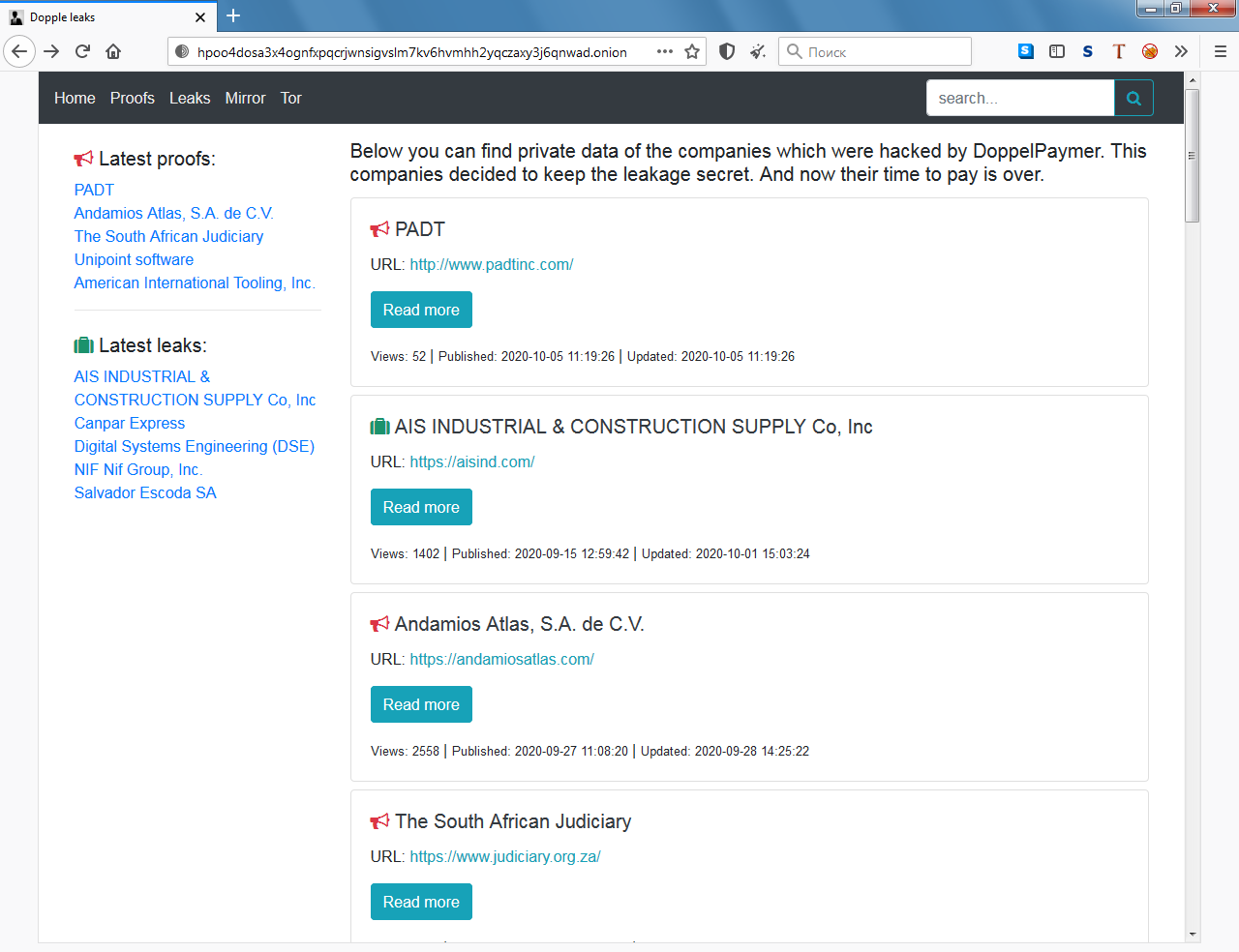
Dopple Leaks site for publishing leaks
Frequently Asked Questions
How сan I avoid ransomware attack?
Doppelpaymer ransomware doesn’t have a superpower.
You can easily protect yourself from its injection in several easy steps :
- Ignore all emails from unknown mailboxes with a strange unknown address, or with content that has likely no connection to something you are waiting for (can you win in a lottery without taking part in it?). If the email subject is likely something you are waiting for, check carefully all elements of the suspicious letter. A fake email will surely contain a mistake.
- Do not use cracked or untrusted programs. Trojans are often distributed as a part of cracked software, possibly under the guise of “patch” which prevents the license check. But untrusted programs are very hard to distinguish from trustworthy software, because trojans may also have the functionality you need. You can try to find information about this program on the anti-malware forums, but the best solution is not to use such programs.


Leave a Comment