
“Your Windows Subscription Has Expired” is a scam that spreads through malicious ads, phishing emails, and compromised websites. It ingeniously manipulates users by displaying fake security alerts and subscription expiration notices, exploiting fears of virus threats and identity theft.
The scam’s key actions include redirecting to bogus pages and offering fraudulent discounts on security subscriptions. Its widespread methods and convincing mimicry of legitimate alerts make it a significant threat to online safety, emphasizing the need for cautious web navigation.
“Your Windows Subscription Has Expired” Scam Overview
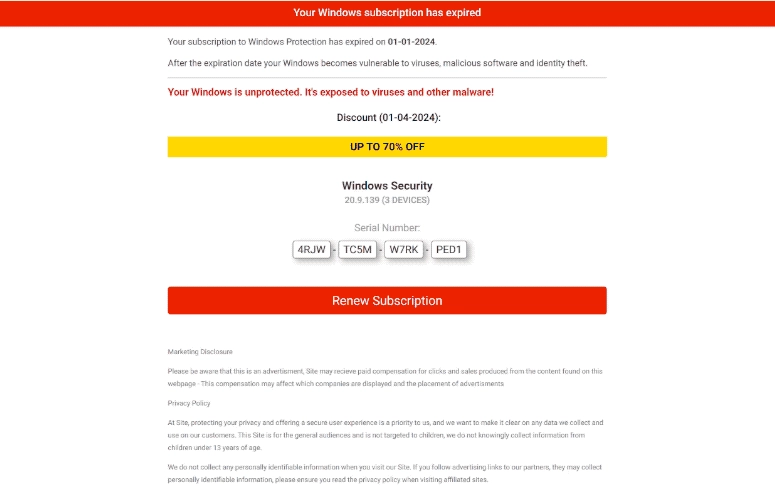
Screen of malicious scam notification
| Name | “Your Windows Subscription Has Expired” scam |
| Threat Type | Phishing, Scam, Social Engineering, Fraud |
| Related Domain | protectionreal[.]space |
| Symptoms | Fake error messages, fake system warnings, pop-up errors, hoax computer scan. |
| Distribution methods | Compromised websites, rogue online pop-up ads, potentially unwanted applications. |
| Similar Behavior | “Your computer is disabled. Please call Microsoft”, “Error Code: 0x80073b01”,“Your Windows 10 is infected with viruses” |
| Damage | Loss of sensitive private information, monetary loss, identity theft, possible malware infections. |
How does “Your Windows Subscription Has Expired” Scam works?
The scam page falsely claims that the user’s Windows subscription has expired, making the system vulnerable to viruses, malicious software, and identity theft. It uses scare tactics, claiming the system is unprotected and at risk. The page offers a so-called 70% discount on a fake Windows Security subscription (version 20.9.139 for three devices) and provides a bogus serial number to trick users into renewing their subscription. The presence of a “Marketing Disclosure” tries to lend false legitimacy.
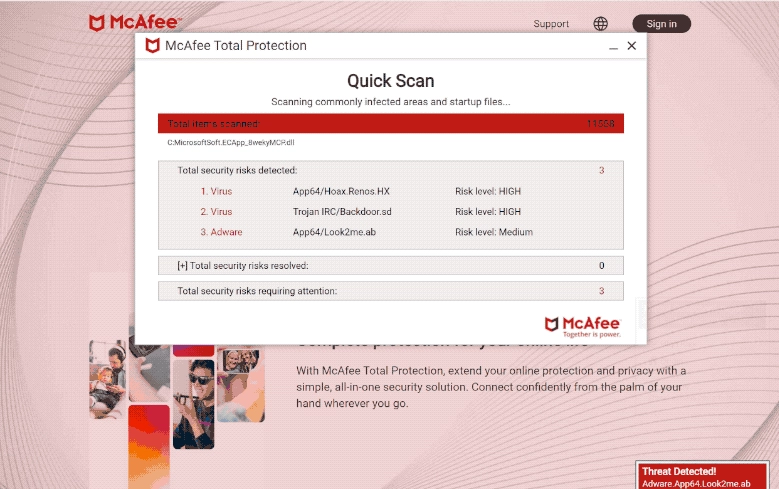
Fake McAfee page
Clicking the “Renew Subscription” button leads users to a fake McAfee page, where a sham system scan pretends to find multiple threats. This scam likely involves affiliates promoting legitimate software, like McAfee antivirus, to earn commissions. They usually exploit the urgency created by fake security threats to push users into buying a subscription through their affiliate links.
How serious is this?
This scam is particularly serious due to its multifaceted approach to deception. By employing scare tactics and faking legitimacy, it preys on users’ fears about system security and personal data safety. Through the use of manipulated search results, rogue advertising, and phishing methods broadens its reach, increasing the potential for victimization. Its ability to mimic reputable companies and fabricate urgency around subscription renewals or system threats compounds the risk. This could potentially lead to financial losses and compromised personal information. Vigilance and skepticism towards unsolicited messages and offers are essential defenses against such sophisticated scams.


Leave a Comment