
The “Your Security Is Not Up-To-Date” scam employs deceptive pop-ups, falsely warning users of security threats and data compromises on their computers. This scam typically spreads through untrustworthy websites and uses scare tactics to coerce users into calling a fake support line.
Once a victim contacts the number, the scammers may request remote access to the user’s device to resolve the non-existent issues, potentially leading to further exploitation. This scheme uses misinformation and fear to manipulate users into engaging with fraudulent tech support.
“Your Security Is Not Up-To-Date” Popup Scam Overview
The “Your Security Is Not Up-To-Date” popup is a technical support scam. This scam operates by making deceptive assertions about the visitor’s computer being infected and their system being locked for security reasons. The primary objective is to deceive the user into dialing a counterfeit support hotline, thereby ensnaring them in an intricate fraudulent scheme.
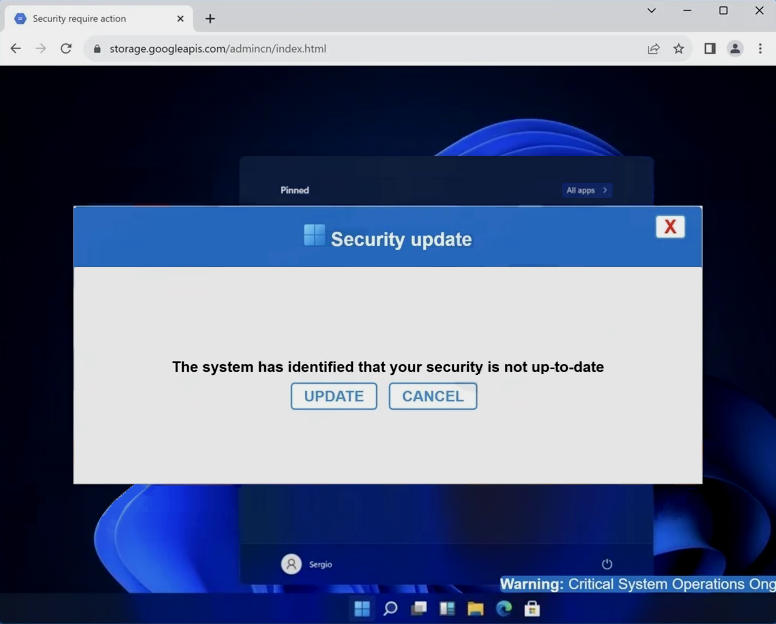
“Your Security Is Not Up-To-Date” web page
| Name | “Your Security Is Not Up-To-Date” tech support scam |
| Threat Type | Phishing, Scam, Social Engineering |
| Symptoms | Fake error messages, fake system warnings, pop-up errors, hoax computer scan. |
| Similar Behavitor | “Google Safe Browser Total Protection” Scam, “Your Windows 10 is infected with viruses” Pop-Up Scam, Your computer is disabled. Please call Microsoft |
| Damage | Loss of sensitive private information, monetary loss, identity theft, possible malware infections. |
Technical Analysis
Upon encountering the “Your Security Is Not Up-To-Date” scam page, several misleading pop-ups were presented. The initial pop-up claimed that the visitor’s system security was outdated. Following the closure of this pop-up, a second one appeared, elaborating on fictitious threats and listing compromised data, including IP address, email, and banking credentials. The scam went as far as to reference a legitimate antivirus software, Norton. It falsely stated that it had detected adware on the device six months prior. The pop-up urgently insisted that the visitor call the provided helpline to immediately resolve these fabricated issues. The last window displayed a fake software update error. It cautioned against turning off the computer to prevent system crashes or hard drive damage.
Notably, the color scheme of this scam mimics the appearance of Windows, and the initial pop-up window features a title bar logo that resembles the Windows logo. It is crucial to stress that all the information presented in this content is entirely false, and this scam is not associated with Windows, Microsoft, Norton AntiVirus, Gen Digital, or any other legitimate products or entities. The subsequent steps taken when a user calls the fraudulent helpline can vary. Typically, tech support scammers may request remote access to the victim’s device, which can be facilitated using legitimate programs such as TeamViewer, AnyDesk, or similar tools.
How did I get to this site?
You may unknowingly access scam websites through various means. These deceptive pages can be triggered when visiting websites linked to untrustworthy advertising networks. Interacting with content on certain websites, such as clicking buttons or links, can also generate redirects to scam pages.
Additionally, mistyping a website’s URL might lead to a redirection chain that lands you on a deceptive webpage. Beware of spam browser notifications, intrusive advertisements, and misleading ads prompted by adware. Scammers often employ spam emails, direct messages, text messages, and social media posts to promote these fraudulent schemes.


Leave a Comment