
Our team researched and described the Xshc virus, which belongs under the Dharma ransomware family. Malware of such sort encrypts all user’s data on the computer (photos, text files, excel sheets, music, videos, etc) and adds its specific extension to every file, leaving the #README-TO-DECRYPT-FILES.txt text files in every folder which contains the encrypted files.
[email protected]: what is known so far?
☝️ Xshc ([email protected]) is a Dharma family ransomware-type virus.
The scheme of renaming is the following: .XSHC. In the course of encryption, a file named, for instance, “report.docx” will be turned into “report.docx.[ID-40290F1].[[email protected]].XSHC”.
In each folder with the encoded files, a #README-TO-DECRYPT-FILES.txt text document will be created. It is a ransom money memo. It contains information about the ways of paying the ransom and some other information. The ransom note usually contains instructions on how to purchase the decryption tool from the Xshc developers. You can get this decoding tool after contacting @Trustfiles (Telegram), [email protected], [email protected] through email. That is pretty much the scheme of the crime.
Xshc Overview:
| Name | Xshc Virus |
| Ransomware family1 | Dharma ransomware |
| Extension | .XSHC |
| Ransomware note | #README-TO-DECRYPT-FILES.txt |
| Contact | @Trustfiles (Telegram), [email protected], [email protected] |
| Detection | Trojan:Win32/Tnega!MSR Removal, Win32:Adware-DNA [Adw] Virus Removal, Win32:Secat [Trj] Virus Removal |
| Symptoms | Your files (photos, videos, documents) get a .XSHC extension and you can’t open them. |
| Fix Tool | See If Your System Has Been Affected by Xshc virus |
The #README-TO-DECRYPT-FILES.txt document coming in package with the Xshc ransomware provides the following frustrating information:
TRUST FILES
Dear Client


If you are reading this message, it means that:


- your network infrastructure has been compromised,
- critical data was leaked,
- files are encrypted


The best and only thing you can do is to contact us to settle the matter before any losses occurs.
If You Want To Restore Them Email Us : [email protected]
If You Do Not Receive A Response Within 24 Hours, Send A Message To Our Second Email : [email protected]
Or Contact via Telegram ID: hxxps://t.me/Trustfiles


1. THE FOLLOWING IS STRICTLY FORBIDDEN
1.1 EDITING FILES ON HDD.
Renaming, copying or moving any files could DAMAGE the cipher and decryption will be impossible.


1.2 USING THIRD-PARTY SOFTWARE.
Trying to recover with any software can also break the cipher and file recovery will become a problem.


1.3 SHUTDOWN OR RESTART THE PC.
Boot and recovery errors can also damage the cipher. Sorry about that, but doing so is entirely at your own risk.


2. EXPLANATION OF THE SITUATION
2.1 HOW DID THIS HAPPEN
The security of your IT perimeter has been compromised (it\'s not perfect at all). We encrypted your workstations and servers to make the fact of the intrusion visible and to prevent you from hiding critical data leaks. We spent a lot of time researching and finding out the most important directories of your business, your weak points. We have already downloaded a huge amount of critical data and analyzed it. Now its fate is up to you, it will either be deleted or sold, or shared with the media.


2.2 VALUABLE DATA WE USUALLY STEAL:
- Databases, legal documents, personal information.
- Audit reports.
- Audit SQL database.
- Any financial documents (Statements, invoices, accounting, transfers etc.).
- Work files and corporate correspondence.
- Any backups.
- Confidential documents.


2.3 TO DO LIST (best practies)
- Contact us as soon as possible. - Contact us only in our Mails or Telegram, otherwise you can run into scammers. - Purchase our decryption tool and decrypt your files. There is no other way to do this. - Realize that dealing with us is the shortest way to success and secrecy. - Give up the idea of using decryption help programs, otherwise you will destroy the system permanently. - Avoid any third-party negotiators and recovery groups. They can become the source of leaks.


3. POSSIBLE DECISIONS
3.1 NOT MAKING THE DEAL
- After 4 days starting tomorrow your leaked data will be Disclosed or sold.
- We will also send the data to all interested supervisory organizations and the media.
- Decryption key will be deleted permanently and recovery will be impossible.
- Losses from the situation can be measured based on your annual budget.


3.2 MAKING THE WIN-WIN DEAL
- Databases, legal documents, personal information.
- You will get the only working Decryption Tool and the how-to-use Manual.
- You will get our guarantees (with log provided) of non-recovarable deletion of all your leaked data.
- You will get our guarantees of secrecy and removal of all traces related to the deal in the Internet.
- You will get our security report on how to fix your security breaches.


4. HOW TO CONTACT US
In our contact form or mail:
Contact via Telegram ID: hxxps://t.me/Trustfiles
Write us to the mails: [email protected] or [email protected]
Write this ID in the title of your message Your ID is on the files


5. EVIDENCE OF THE LEAKAGE
5.1 You can request sample files chat to review leaked data samples.
5.2 Contact us only in our Mails or Telegram, otherwise you can run into scammers.
5.3 All leaked Data samples will be Disclosed in 4 Days if you remain silent.
5.4 Your Decryption keys will be permanently destroyed at the moment the leaked Data is Disclosed.


6. RESPONSIBILITY
6.1 Breaking critical points of this offer will cause:
Deletion of your decryption keys.
Immediate sale or complete Disclosure of your leaked data.
Notification of government supervision agencies, your competitors and clients.
In the screenshot below, you can see what a folder with files encrypted by the Xshc looks like. Each filename has the “.XSHC” extension appended to it.
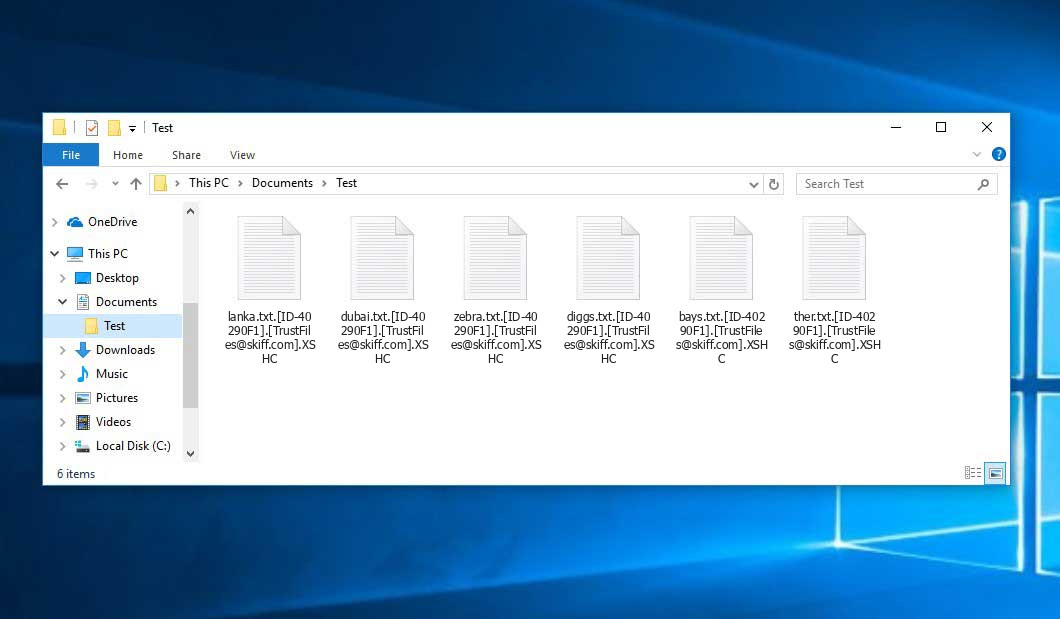
That is how encrypted “.XSHC” files look.
How did Xshc ransomware end up on my PC?
There are many possible ways of ransomware infiltration.
There are currently three most exploited ways for hackers to have ransomware settled in your system. These are email spam, Trojan injection and peer-to-peer networks.
- Another thing the hackers might try is a Trojan horse scheme. A Trojan is a program that infiltrates into your PC disguised as something legal. For instance, you download an installer for some program you want or an update for some program. But what is unboxed turns out to be a harmful agent that encrypts your data. Since the installation package can have any name and any icon, you’d better be sure that you can trust the resource of the files you’re downloading. The best way is to use the software companies’ official websites.
- As for the peer-to-peer file transfer protocols like torrent trackers or eMule, the threat is that they are even more trust-based than the rest of the Internet. You can never know what you download until you get it. Our suggestion is that you use trustworthy websites. Also, it is reasonable to scan the folder containing the downloaded files with the anti-malware utility as soon as the downloading is done.
How to remove ransomware?
It is important to note that besides encrypting your files, the Xshc virus will most likely deploy Vidar Stealer on your computer to seize your credentials to various accounts (including cryptocurrency wallets). That program can derive your credentials from your browser’s auto-filling cardfile.
How to avert ransomware infiltration?
Xshc ransomware has no endless power, so as any similar malware.
You can armour yourself from ransomware infiltration in several easy steps:
- Never open any emails from unknown senders with strange addresses, or with content that has likely no connection to something you are waiting for (how can you win in a money prize draw without participating in it?). If the email subject is likely something you are waiting for, scrutinize all elements of the dubious letter with caution. A fake letter will surely have mistakes.
- Avoid using cracked or unknown software. Trojan viruses are often shared as an element of cracked products, possibly as a “patch” preventing the license check. But untrusted programs are difficult to tell from reliable software, because trojans may also have the functionality you need. You can try to find information about this software product on the anti-malware forums, but the optimal solution is not to use such software.
FAQ
🤔 Is it possible to open “.XSHC” files?
There’s no way to do it, unless the files “.XSHC” files are decrypted.
🤔 The encrypted files are very important to me. How can I decrypt them quickly?
If the “.XSHC” files contain some really important information, then you probably have them backed up. Otherwise, you might try to employ System Restore. The only question is whether you have saved any Restore Points that would be helpful now. The rest of the methods require patience.
🤔 What should I do if the Xshc virus has blocked my PC and I can’t get the activation code.
🤔 What could help the situation right now?
Some of the blocked files can be found elsewhere.
- If you sent or received your critical files via email, you could still download them from your online mail server.
- You might have shared photographs or videos with your friends or family members. Just ask them to send those pictures back to you.
- If you have initially got any of your files from the Web, you can try doing it again.
- Your messengers, social media pages, and cloud disks might have all those files too.
- Maybe you still have the needed files on your old PC, a portable device, cellphone, memory stick, etc.
USEFUL TIP: You can use file recovery utilities2 to get your lost data back since ransomware encrypts the copies of your files, deleting the original ones. In the video below, you can learn how to use PhotoRec for such a recovery, but remember: you can do it only after you eradicate the virus with an anti-malware program.


Leave a Comment