
“Trojan Spyware Alert” scam – employs various deceptive tactics to infiltrate users’ systems. Often via untrusted websites, misleading ads, or potentially unwanted applications (PUAs).
Once triggered, it inundates users with fraudulent error messages, coercing them to call a specific number for assistance. Scammers behind the scheme then attempt to extort money or gain remote access to the victim’s device. Staying cautious and refraining from engaging with such pop-ups is vital to prevent falling prey to these harmful actions.
“Trojan Spyware Alert” Scam Overview
The “Trojan Spyware Alert” pop-up scam involves deceptive websites that resemble Microsoft’s official site. However, Microsoft has no affiliation with these sites. They should be avoided. This specific webpage is hosted on Amazon AWS, a legitimate Amazon service. Unfortunately, cybercriminals often misuse this service for malicious activities.
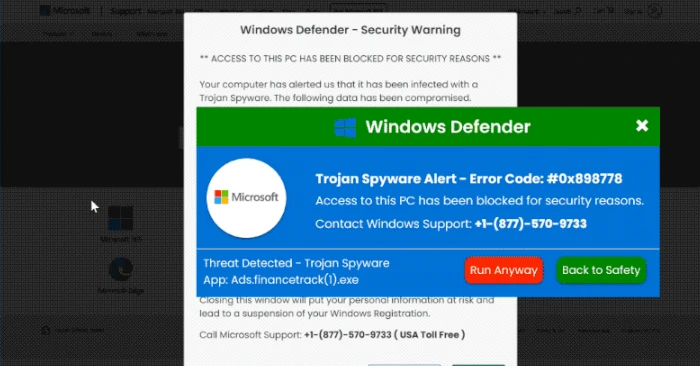
Screen of pop-up scam notification
| Name | “Trojan Spyware Alert” tech support scam |
| Threat Type | Phishing, Scam, Social Engineering, Fraud |
| Tech Support Scammer Phone Number | +1-(877)-570-9733, +1-(888)-531-1238, +1-844-264-1242, +1-888-499-8293, +1-866-365-3199, +1-833-247-6042, +1-888-855-5715, 1-888-308-5705, +1-(888)-395-1684, +1-866-401-0380, +1-888-499-5065, +1-833-810-6299, +1-833-847-0571, +1-888-499-4320, +1 +1-865-567-0642, +1-877-778-5029, +1-866-499-3309, +1-833-307-2782, +1-877-755-1772, +1-866-498-4804, +1-877-791-1437, +1-877-841-0234, +1-877-682-0208, +1-843-400-1535, +1(844) 535-0929 |
| Symptoms | Fake error messages, fake system warnings, pop-up errors, hoax computer scan. |
| Similar Behavior | “Virus Has Been Detected On Your Device”, “Your Windows 10 is infected with viruses”, “Critical Threat Detected: Adware App” |
| Damage | Loss of sensitive private information, monetary loss, identity theft, possible malware infections. |
| Distribution methods | Compromised websites, rogue online pop-up ads, potentially unwanted applications. |
How does “Trojan Spyware Alert” Scam work?
Visitors are directed to address the issue by immediately calling the +1-(877)-570-9733 number, supposedly for “Windows Support.” Typically, the scammers operating these pages aim to deceive users into paying for what they claim are genuine technical support services and software. They may also seek permission to remotely control the user’s computer through a Remote Access/Administration Tool (RAT).
It’s crucial to be aware that granting such access to cybercriminals can result in malware infections, such as ransomware or Trojan-type malware. Additionally, these individuals might steal personal information or engage in other malicious activities.
How serious is this?
The seriousness of this situation cannot be overstated. Numerous scams akin to this one include variations like “Trojan Spyware Alert,” “ERROR # 0x6a4-0xf9fx3999,” “Activation Failed! (Error Code 001),” and “Windows Error Code: DLL011150.” These deceptive pages aim to persuade visitors that their computers are plagued by issues, prompting them to dial a specified number.
Browser hijackers, adware-type applications, and various Potentially Unwanted Applications (PUAs) frequently employ a distribution method wherein they are bundled into the download and installation processes of other software. Consequently, a significant number of users unwittingly download and install these PUAs alongside their desired software.

