
The G-stars virus falls within the Phobos ransomware family. Malware of this type encrypts all the data on your computer (photos, text files, excel sheets, music, videos, etc) and adds its specific extension to every file, leaving the info.txt files in every directory with the encrypted files.
G-stars virus: what is known so far?
☝️ G-stars is a Phobos family ransomware-type virus.
The renaming will be executed by this pattern: id[xxxxx].[contact-email].G-STARS. During the encryption, a file named, for instance, “report.docx” will be altered to “report.docx.id[9ECFA84E-3442].[[email protected]].G-STARS”.
In every directory that contains the encrypted files, a info.txt text file will be found. It is a ransom money memo. Therein you can find information on the ways of contacting the racketeers and some other information. The ransom note most probably contains instructions on how to buy the decryption tool from the tamperers. You can get this decrypting software after contacting [email protected] via email. That is basically the scheme of the malefaction.
G-stars Overview:
| Name | G-stars Virus |
| Ransomware family1 | Phobos ransomware |
| Extension | .G-STARS |
| Ransomware note | info.txt |
| Contact | [email protected] |
| Detection | Troj/Krypt-VK, Trojan:Win32/QuasarRAT.DH!MTB, VirTool:MSIL/Meagre.A!MTB |
| Symptoms | Your files (photos, videos, documents) get a .G-STARS extension and you can’t open them. |
| Fix Tool | See If Your System Has Been Affected by G-stars virus |
The info.txt document accompanying the G-stars ransomware provides the following frustrating information:
Hello my dear friend
Your data is encrypted


Unfortunately for you, a major IT security weakness left you open to attack, your files have been encrypted.
The only method of recovering files is to purchase decrypt tool and unique key for you.
If you want to recover your files, write us to this e-mail: [email protected]
In case of no answer in 24 hours write us to this backup e-mail: [email protected]
Our online operator is available in the messenger Telegram: @Files_decrypt or hxxps://t.me/Files_decrypt
If there is no response from our mail, you can install ICQ software on your PC here hxxps://icq.com/windows/ or on smartphone from Appstore / Google Play Market search for \"ICQ\"
Write to our ICQ @Ransomware_Decrypt hxxps://icq.im/Ransomware_Decrypt/
Or download the (Session) messenger (hxxps://getsession.org) in messenger: 0569a7c0949434c9c4464cf2423f66d046e3e08654e4164404b1dc23783096d313 You have to add this Id and we will complete our converstion
Or download the Tox Chat (hxxps://tox.chat/download.html) in messenger: C20A4B4AC30BBF70E7F2340FC0F97B08FA58B6E041557ABBF29EAF82FED0C47D79239FA26B51
You must add this Id and write to us
Please note that you\'ll never restore your data without payment.
Check your e-mail \"Spam\" or \"Junk\" folder if you don\'t get answer more than 6 hours.
Contact us soon, because those who don\'t have their data leaked in our press release blog and the price they\'ll have to pay will go up significantly.


Attention!


Do not rename encrypted files.
Do not try to decrypt your data using third party software - it may cause permanent data loss.
We are always ready to cooperate and find the best way to solve your problem.
The faster you write - the more favorable conditions will be for you.
Our company values its reputation. We give all guarantees of your files decryption.


Sensitive data on your system was DOWNLOADED.
If you DON\'T WANT your sensitive data to be PUBLISHED you have to act quickly.


Data includes:
- Employees personal data, CVs, DL, SSN.
- Complete network map including credentials for local and remote services.
- Private financial information including: clients data, bills, budgets, annual reports, bank statements.
- Manufacturing documents including: datagrams, schemas, drawings in solidworks format
- And more...
In the image below, you can see what a folder with files encrypted by the G-stars looks like. Each filename has the “.G-STARS” extension added to it.
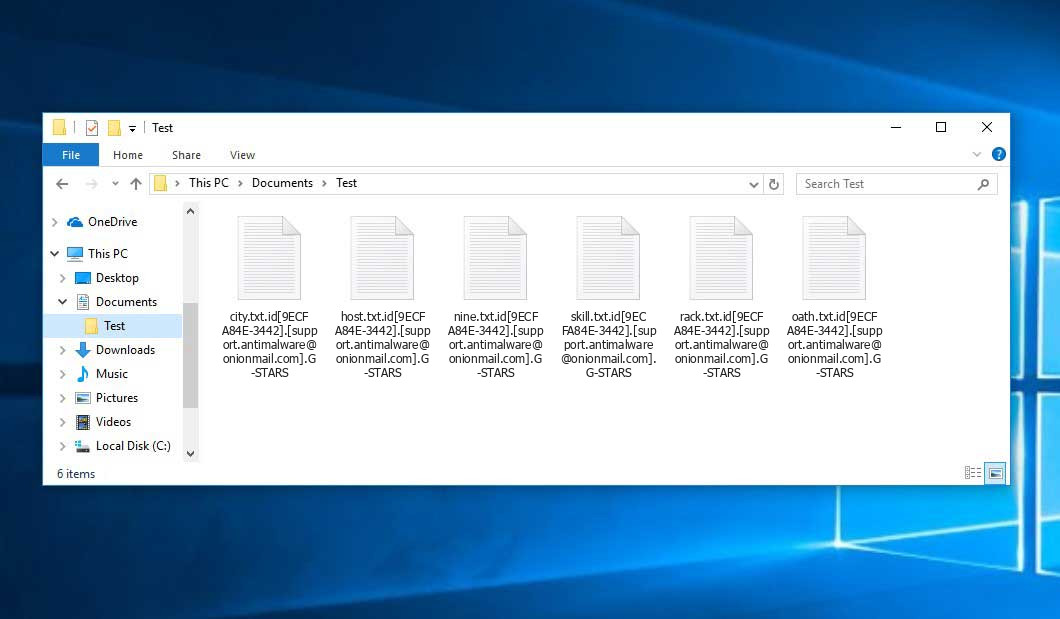
That is how encrypted “.G-STARS” files look.
How did G-stars ransomware end up on my PC?
There is a huge number of possible ways of ransomware infiltration.
There are currently three most popular ways for hackers to have ransomware planted in your system. These are email spam, Trojan introduction and peer-to-peer file transfer.
Another option for ransom hunters is a Trojan horse scheme. A Trojan is an object that gets into your computer disguised as something different. For example, you download an installer of some program you want or an update for some service. But what is unpacked turns out to be a harmful program that encodes your data. Since the installation file can have any title and any icon, you’d better be sure that you can trust the source of the stuff you’re downloading. The optimal way is to trust the software companies’ official websites.
As for the peer networks like torrent trackers or eMule, the threat is that they are even more trust-based than the rest of the Internet. You can never know what you download until you get it. Our suggestion is that you use trustworthy websites. Also, it is reasonable to scan the directory containing the downloaded objects with the antivirus as soon as the downloading is finished.
How do I get rid of ransomware?
It is important to note that besides encrypting your files, the G-stars virus will probably deploy Vidar Stealer on your computer to get access to credentials to various accounts (including cryptocurrency wallets). That spyware can extract your logins and passwords from your browser’s auto-filling cardfile.
How to avert ransomware injection?
G-stars ransomware has no superpower, so as any similar malware.
You can defend your computer from ransomware attack in several easy steps:
- Never open any letters from unknown mailboxes with unknown addresses, or with content that has likely no connection to something you are expecting (can you win in a money prize draw without participating in it?). In case the email subject is more or less something you are waiting for, check all elements of the dubious letter with caution. A hoax email will surely have a mistake.
- Never use cracked or unknown programs. Trojan viruses are often spreaded as an element of cracked software, possibly under the guise of “patch” to prevent the license check. Understandably, untrusted programs are very hard to distinguish from trustworthy software, because trojans may also have the functionality you need. You can try searching for information on this software product on the anti-malware message boards, but the best solution is not to use such software.
FAQ
🤔 Can I somehow access “.G-STARS” files?
Unfortunately, no. You need to decipher the “.G-STARS” files first. Then you will be able to open them.
🤔 I really need to decrypt those “.G-STARS” files ASAP. How can I do that?
If the “.G-STARS” files contain some really important information, then you probably have them backed up. Otherwise, you might try to employ System Restore. The only question is whether you have saved any Restore Points that would be helpful now. There are other ways to beat ransomware, but they take time.
🤔 What to do if the G-stars ransomware has blocked my PC and I can’t get the activation code.
🤔 And what should I do now?
Some of the encrypted files can be found elsewhere.
- If you exchanged your important files by email, you could still download them from your online mailbox.
- You may have shared photographs or videos with your friends or family members. Just ask them to post those images back to you.
- If you have initially got any of your files from the Web, you can try to do it again.
- Your messengers, social media pages, and cloud storage might have all those files too.
- It might be that you still have the needed files on your old PC, a notebook, cellphone, external storage, etc.
USEFUL TIP: You can employ data recovery programs2 to get your lost data back since ransomware blocks the copies of your files, removing the original ones. In the tutorial below, you can see how to recover your files with PhotoRec, but be advised: you won’t be able to do it before you kill the ransomware itself with an antivirus program.


Leave a Comment