
Cinoshi is info stealer malware that spreads through the web, leveraging tactics chosen by cybercriminals of the moment. Crooks uses phishing and social engineering to disguise it within typical programs or media, spanning various file types.
Once triggered, it exerts a range of actions, including data extraction, cryptocurrency mining, botnet capabilities, and clipper functions. Vigilance against its diverse distribution methods is paramount to ward off its potential impact.
Cinoshi Overview
Cinoshi is an information-stealing malware. It includes various iterations, like botnet, clipper, and cryptominer functionalities. The intrusion of Cinoshi malware into a system poses a dual threat to both device integrity and user privacy.
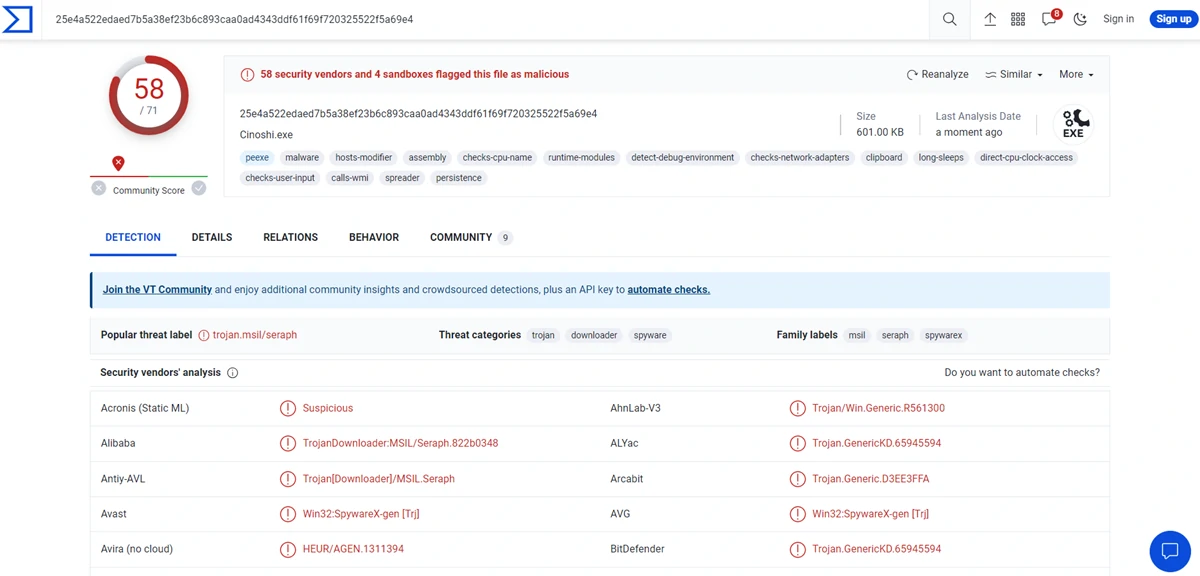
VirusTotal results
| Name | Cinoshi |
| Detection | Microsoft: Trojan:MSIL/CinoshiStealer.A!MTB, Gridinsoft: Trojan.Heur!.030130A1 |
| Threat Type | spyware, trojan |
| Damage | Trojans exhibit a covert modus operandi, infiltrating systems discreetly and maintaining silence. This clandestine approach often results in no conspicuous symptoms being discernible on the compromised machine. |
| Similar Behavior | FateGrab, Enigma Stealer |
Technical Analysis
Cinoshi emerged as a prevalent threat on the web. Developers offered the core stealer functionality for free, while additional features were purchasable. Consequently, the operational capabilities of Cinoshi malware in any infection scenario are contingent on the choices made by the perpetrators at the time. The basic version of Stealer excels at extracting device data and insights from installed applications, notably targeting browsers like Microsoft Edge and Gecko. This includes histories, cookies, personal identifiers, login credentials, and credit card details.
Moreover, Cinoshi gathered information from over thirty-five cryptocurrency wallets and relevant browser extensions. It extends its reach to encompass sessions from Steam, along with tokens sourced from messaging platforms like Discord and Telegram. A distinctive evasion tactic Cinoshi utilizes is to add itself to the Microsoft Defender safelist.
In essence, Cinoshi’s presence ushers in a gamut of risks, encompassing compromised system performance, data vulnerability, privacy breaches, hardware impairments, financial losses, and identity theft.
Spreading Methods
Cinoshi’s distribution dynamics hinge on the tactics of the specific cybercriminals in play, given its web-based accessibility. Typically, malware dissemination relies on phishing and social engineering stratagems. Malicious software is commonly camouflaged as, or bundled with, ordinary programs or media. The malevolent payload might be concealed within archives (ZIP, RAR), executables (.exe, .run), documents (Microsoft Office, OneNote, PDF), and JavaScript, among others. Activation of such files triggers the malware’s download and installation process.
Prevalent distribution avenues encompass inconspicuous “drive-by” downloads, attachment or link-based spam mail (emails, PMs/DMs, SMSes), online scams, dubious download platforms (freeware sites, third-party websites, P2P networks), illegal software activation tools (“cracks”), counterfeit updates, and malvertising.


Leave a Comment