
Trojan:JS/Phish is a trojan horse malware targeting web browsers and employing JavaScript (JS) to perform malicious operations. This trojan steals sensitive information, including login credentials, personal data, and financial details, by deceiving users into disclosing them on deceptive or phishing websites.
Once Trojan:JS/Phish infects a system, it operates by redirecting the user’s web browser to malicious websites that closely resemble legitimate ones, such as online banking portals, social media platforms, or email login pages. These fraudulent websites aim to trick users into providing confidential information.
Trojan:JS/Phish employs various techniques to replicate legitimate websites, including replicating visual elements, layout, and even URL structures. The malware often utilizes social engineering tactics, such as urgent messages or enticing offers, to persuade users to enter their credentials or personal information without suspecting malicious intent.
When users enter sensitive information on the phishing website, Trojan:JS/Phish captures and transmits the data to the attackers, who can exploit it for identity theft, financial fraud, or other nefarious purposes.
To protect yourself from Trojan:JS/Phish and similar threats, you must exercise caution while browsing the internet. You should be vigilant in verifying the authenticity of websites, particularly when providing sensitive information. Avoid clicking on suspicious links or pop-up ads, and make sure to regularly update your web browser and security software. It will ensure they have the latest security patches and offer protection against known threats.
The criminals behind JS/Phish primarily aim to profit from their actions. They employ various malicious programs to obtain your credit card information, electronic banking credentials, and other sensitive data for deceptive purposes.
Over the past ten years, the types of viruses that were widespread have evolved, and the focus has shifted toward issues such as blackmail and spyware. Dealing with these emerging challenges necessitates the development of new tools and approaches.
Does your antivirus regularly report about the “JS/Phish”?
If you have encountered a message indicating the detection of “Trojan:JS/Phish”, it is indeed good news! The malware “Trojan:JS/Phish” has been identified and most likely removed. Such messages do not necessarily mean an active JS/Phish was on your device. You may have downloaded a file containing Trojan:JS/Phish, and your antivirus software promptly deleted it before it could execute and cause any issues. Alternatively, the malicious script on the infected website may have been detected and blocked before causing any harm.
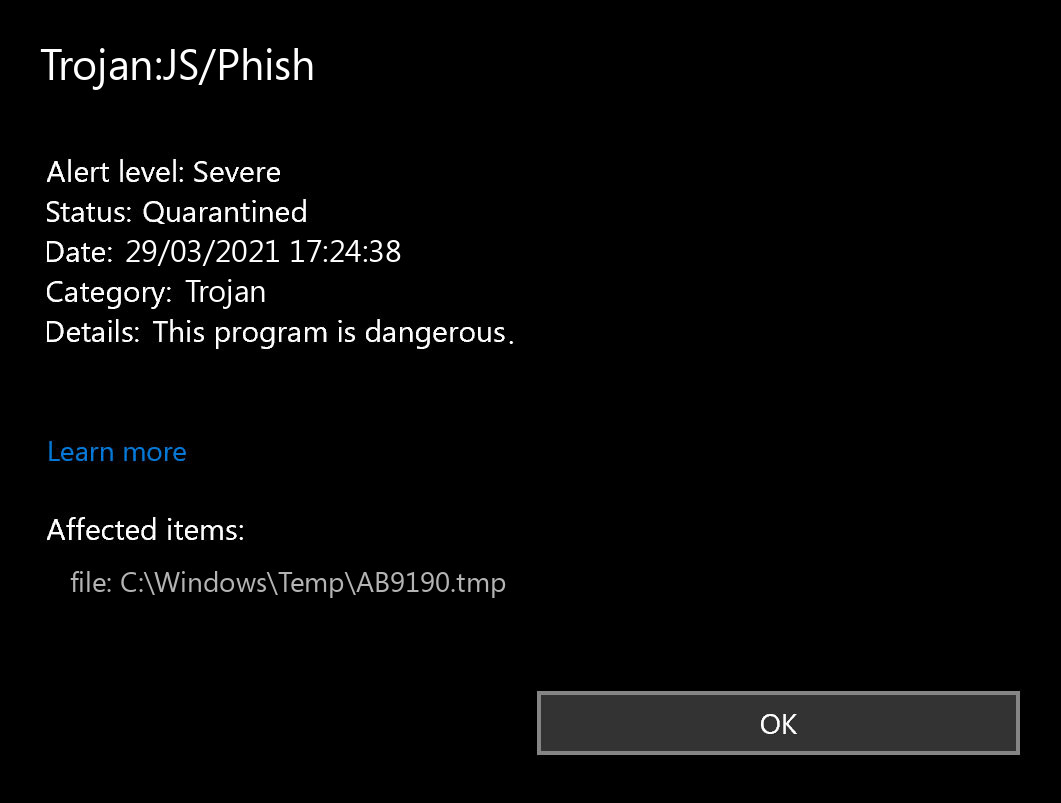
Microsoft Defender: “Trojan:JS/Phish”
Simply put, the message “Trojan:JS/Phish Found” during the usual use of your computer does not indicate that the JS/Phish has actually completed its goal. If you see such a message, then maybe the proof of seeing the contaminated page or loading the harmful file. Try to prevent it in the future, but don’t fret excessively. Explore opening the antivirus program and examining the Trojan:JS/Phish detection log data. It will offer you more information regarding what the specific JS/Phish was identified as well as what was particularly done by your antivirus software with it. Obviously, if you’re not positive enough, describe the manual check– anyway, this will certainly be valuable.
How to scan for malware, spyware, ransomware, adware, and other threats.
If your computer operates in an exceptionally lagging way, the website open in a weird fashion, or if you see advertisements in a position you’ve never anticipated, it’s feasible that your system got contaminated and the virus is active. Spyware will certainly track all your activities or reroute your search or web page to the places you don’t wish to check out. Adware may contaminate your browser and also the whole Windows OS. In contrast, the ransomware will certainly attempt to obstruct your computer and require a remarkable ransom amount for your data.
How to scan your PC for Trojan:JS/Phish?
Use Safe Mode to fix the most complex Trojan:JS/Phish issues.
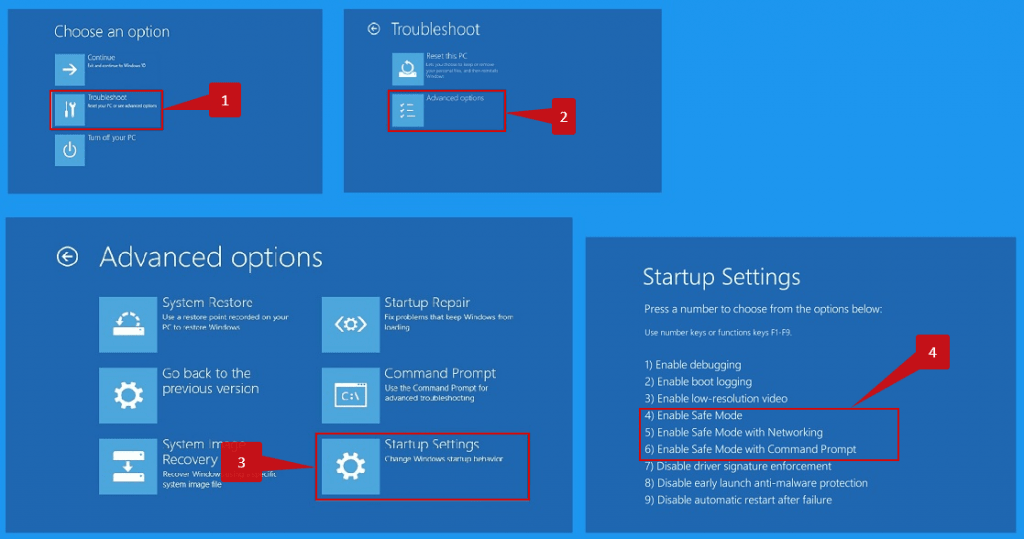
It’s not enough to just use the antivirus to secure your PC. You require to have a more detailed antivirus solution. Typical antivirus scanners primarily search for virus-type dangers and may be unable to identify all types of malware. Your system may be full of “junk”, for example, toolbars, web browser plugins, dubious search engines, bitcoin miners, and various other sorts of unwanted software used for making money on your inexperience. Be cautious while downloading programs on the web to avoid your gadget from being filled with unwanted toolbars and various other scrap data.


Leave a Comment