
The browser extension known as Shampoo is a component of the latest ChromeLoader malware campaign, primarily functioning as a browser hijacker with additional adware functionalities.
Typically, browser hijackers modify browser settings by redirecting default search engines, homepages, and new tab/window URLs to specific promoted websites. However, not all browser hijackers make these alterations.
Shampoo (ChromeLoader) Malware
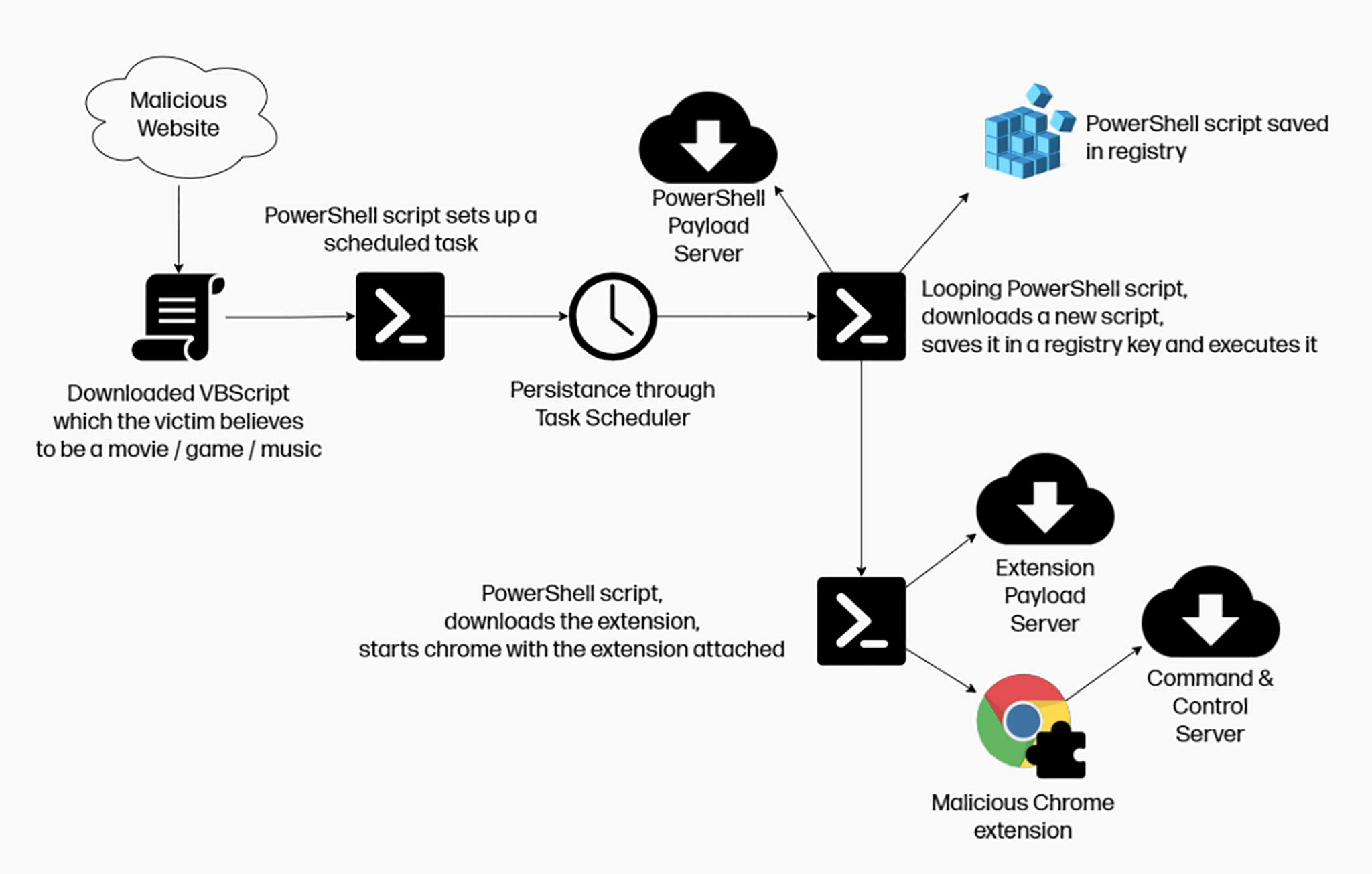
Shampoo ChromeLoader Malware
Fake search engines
Fake search engines like ythingamgladt.com often redirect users to genuine search websites such as Bing, Yahoo, Google, and others because they are unable to provide search results themselves. However, the specifics of redirects may vary based on factors like user geolocation.
As previously mentioned, the Shampoo browser extension employs various techniques to ensure persistence and hinder users from recovering their browsers.
Specifically, Shampoo infiltrates systems when users download a VBScript that executes a PowerShell script, creating a scheduled task that repeats at specified intervals. Even if the looping script is terminated through the Task Manager or system restart, it resurfaces according to the schedule. Additionally, another PowerShell script is run, resulting in the installation of the Shampoo extension.
Shampoo Hijacker
The Shampoo browser extension is also categorized as adware since it displays advertisements. These ads primarily promote online scams, harmful apps/extensions, and even malware. Clicking on certain intrusive ads can execute scripts that initiate downloads or installations without user consent.
Like most browser hijackers, Shampoo has the ability to track user data. This includes search queries, visited URLs, viewed webpages, internet cookies, login credentials, personally identifiable information, credit card numbers, and more. The collected data can be monetized through third-party sales.
Shampoo as a threat
It is important to note that ChromeLoader malware demonstrates versatility as a threat. There have been cases where extensions belonging to this family have caused chain infections, downloading and installing trojans, ransomware, and other malicious software. Therefore, the Shampoo browser extension could potentially be updated with additional or different dangerous capabilities, or employ alternative persistence techniques.
Tracking of Internet Browsing
When browsing the internet, it is important to be aware of potential privacy concerns, unwanted advertisements, and redirects to dubious websites that can occur.
One common issue is internet browser tracking, which can lead to privacy concerns. Websites and online services may track your browsing activities, collecting information such as visited websites, search queries, and clicked links. This data can be used for various purposes, including targeted advertising, user profiling, and even selling your personal information to third parties. To protect your privacy, it is recommended to use privacy-oriented browser settings, enable do-not-track options if available, and regularly clear your browsing history and cookies.
Unwanted Ads
Another annoyance is the display of unwanted ads while browsing. Advertisements can be intrusive, distracting, and sometimes malicious. Adware and browser extensions may inject additional advertisements into webpages, disrupt the browsing experience, and slow down page loading. To mitigate this, consider using ad blockers or browser extensions that block unwanted ads, ensuring a cleaner and smoother browsing experience.
Dubious Website Redirects
Additionally, redirects to dubious websites can occur, particularly when encountering malicious links or visiting compromised websites. These redirects may lead to fake search engines, phishing sites, or pages hosting malware. It is crucial to be cautious and avoid clicking on suspicious links or visiting unfamiliar websites. Keeping your browser and security software up to date helps protect against known vulnerabilities and provides an additional layer of defense against potential threats.
By staying vigilant and taking necessary precautions, you can minimize the risks associated with internet browser tracking, unwanted ads, and redirects to dubious websites, ensuring a safer and more enjoyable browsing experience.
In conclusion, the presence of software like Shampoo on your device can lead to system infections, severe privacy issues, financial losses, and even identity theft.
| Name | Shampoo |
| Similar behavior | ChromeLoader |
| Damage | Tracking of Internet Browsing, Unwanted Ads, and Dubious Website Redirects |
How Did Shampoo (ChromeLoader) Install on My PC?
The installation of Shampoo (ChromeLoader) on your computer can occur through various means and deceptive tactics. Understanding how it infiltrates systems can help prevent similar infections in the future.
One method observed is the distribution of Shampoo through a VBScript hosted on illegal content hosting websites. Users, believing they are accessing pirated programs, movies, video games, or other media, unknowingly allow the browser hijacker into their devices.
However, it is important to note that browser-hijacking software like Shampoo utilizes multiple techniques for distribution. One such method is through the “bundling” marketing tactic, where the hijacker is bundled with seemingly harmless software installers. This means that users inadvertently install Shampoo when installing other legitimate applications.
Browser hijackers can also have “official” promotional webpages and may be pushed through scam sites. Visitors to these pages often arrive through redirects caused by mistyped URLs, websites utilizing rogue advertising networks, spam browser notifications, intrusive ads, or pre-existing adware on their systems.
Intrusive advertisements also play a role in proliferating Shampoo. When users click on certain ads, scripts may be executed discreetly to initiate stealthy downloads or installations without their knowledge.
Being cautious when accessing illegal content hosting websites, carefully reading through software installation processes, and avoiding clicking on suspicious ads or links can help reduce the risk of Shampoo (ChromeLoader) or similar malware installations on your computer.


Leave a Comment