
X3ph initially analyzed ChromeLoader, and G-Data researchers later dubbed it the Choziosi loader. This malware aims to install malicious extension(s) onto browsers. Currently, there are two distinct variants of ChromeLoader that have been detected – one targets Windows Operating Systems, and the other targets MacOS.
It’s important to note that this piece of malicious software actively spreads through Twitter using QR codes that promote pirated software, primarily video games, and media such as movies and TV shows.
Overview of ChromeLoader malware
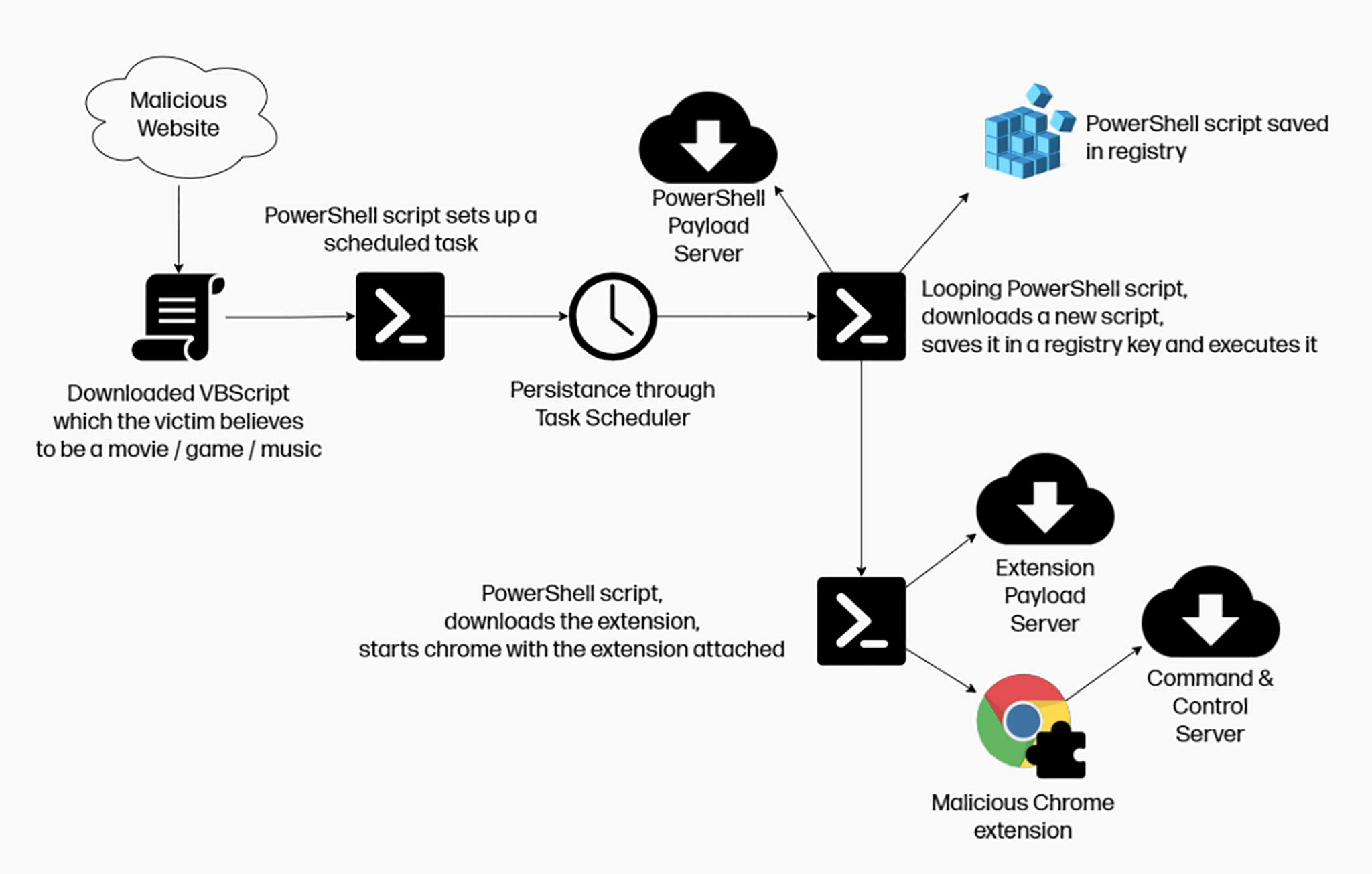
ChromeLoader Malware
Infection chain starts with Tweets
As mentioned earlier, ChromeLoader is designed to install malicious extensions onto browsers. The observed infection chain starts with Tweets (Twitter posts) that advertise pirated content through QR codes presented in meme format, tricking victims into downloading an ISO file.
G-Data researchers conducted an in-depth analysis of this loader and the malicious extension. Their research revealed that the ISO file consists of two components – “_meta.txt” and “downloader.exe“. The former contains an encrypted PowerShell script, while the latter is used to decrypt it.
PowerShell script
The PowerShell script creates a task named “ChromeTask” (may vary), which is scheduled to run every ten minutes. Additionally, the PowerShell script downloads the malicious Google Chrome browser extension “archive.zip“. However, due to the repetitive task, some victims have reported that their Chrome browsers continuously close themselves, which inadvertently facilitates the swifter detection of ChromeLoader.
It’s worth mentioning that “downloader.exe” may display an alert to users stating that the Operating System is incompatible with the software.
Malicious browser extension
G-Data’s analysis primarily focused on the malicious browser extension, as it had not been thoroughly researched before. The Chrome extension is heavily obfuscated, making the analysis more challenging.
This software utilizes techniques to ensure persistence, specifically by denying access to the Google Chrome extensions list (“chrome://extensions/”) and redirecting users to general settings (“chrome://settings”), thereby preventing them from removing the malicious extension.
Using PowerShell and extensive obfuscation is uncommon for adware and browser hijackers, but it is standard for information-stealing programs, spyware, and other types of malware. However, it’s possible that ChromeLoader is still under development and may be updated with additional harmful functionalities. Nonetheless, ChromeLoader remains a significant threat in its current form (more information on new variants below).
Colin Cowie’s research determined that the Mac version of ChromeLoader operates similarly to the Windows variant, showing ads and causing redirects. Notably, this version can install malicious extensions on both Google Chrome and Safari browsers.
If you suspect that your device is infected with ChromeLoader malware, we strongly recommend using an anti-virus to promptly remove it.
| Name | ChromeLoader |
| Detection | Trojan:MSIL/Tnega!mclg |
| Similar behavior | Rustystealer, Puadlmanager |
| Damage | You may encounter several issues while browsing the internet, such as experiencing advertisements that do not originate from the sites you are visiting, intrusive pop-up ads, a decrease in internet browsing speed, and manipulation of your internet browser settings. In addition, you may be forced to visit the hijacker’s website and use their search engines to conduct internet searches. |
How did ChromeLoader infiltrate my computer?
As we mentioned earlier, ChromeLoader has gained significant traction through Tweets that promote illegal content, such as pirated video games, editing software, movies, and TV series. These Tweets include QR codes that entice users into downloading an infectious ISO file. Additionally, ChromeLoader is distributed through malicious ads, browser redirects, and YouTube comments.
However, it’s important to note that ChromeLoader malware may also be distributed on other platforms and potentially using different disguises.
Malware is commonly spread using various techniques, with phishing and social engineering playing a significant role in the distribution of malicious software. Virulent files can take the form of archives, executables, PDF and Microsoft Office documents, JavaScript, and more. Once a malicious file is opened, the infection chain is initiated.
How to avoid installing malware?
We strongly recommend exercising caution while browsing the internet, as illegitimate and malicious content often appears harmless. It is essential to download software only from official and verified sources.
Equally important is the activation and updating of software using the functions and tools provided by genuine developers. Third-party sources can potentially include malware.
Another crucial recommendation is to handle incoming mail with care. Do not open attachments or click on links found in suspicious or irrelevant emails and messages, as they can lead to system infections.


Leave a Comment