
The Dominus virus falls under the ransomware type of infection. A harmful program of this type encrypts all user’s data on the PC (images, text files, excel sheets, audio files, videos, etc) and appends its extra extension to every file, leaving the RANSOM_NOTE.html text files in every directory with the encrypted files.
What is known about the Dominus virus?
Dominus appends its own .dominus extension to every file’s title. For instance, an image named “photo.jpg” will be renamed to “photo.jpg.dominus”. Likewise, the Excel file with the name “table.xlsx” will become “table.xlsx.dominus”, and so forth.
In each folder with the encrypted files, a RANSOM_NOTE.html text document will appear. It is a ransom money note. It contains information on the ways of paying the ransom and some other information. The ransom note usually contains a description of how to purchase the decryption tool from the ransomware developers. You can obtain this tool after contacting [email protected], [email protected] through email. That is it.
Dominus Overview:
| Name | Dominus Virus |
| Extension | .dominus |
| Ransomware note | RANSOM_NOTE.html |
| Contact | [email protected], [email protected] |
| Detection | Trojan:Win32/Tnega!MSR Removal, Win32:Adware-DNA [Adw] Virus Removal, Win32:Secat [Trj] Virus Removal |
| Symptoms | Your files (photos, videos, documents) have a .dominus extension and you can’t open them. |
| Fix Tool | See If Your System Has Been Affected by Dominus virus |
The RANSOM_NOTE.html document accompanying the Dominus malware provides the following frustrating information:
[email protected], [email protected]
In the picture below, you can see what a folder with files encrypted by the Dominus looks like. Each filename has the “.dominus” extension added to it.
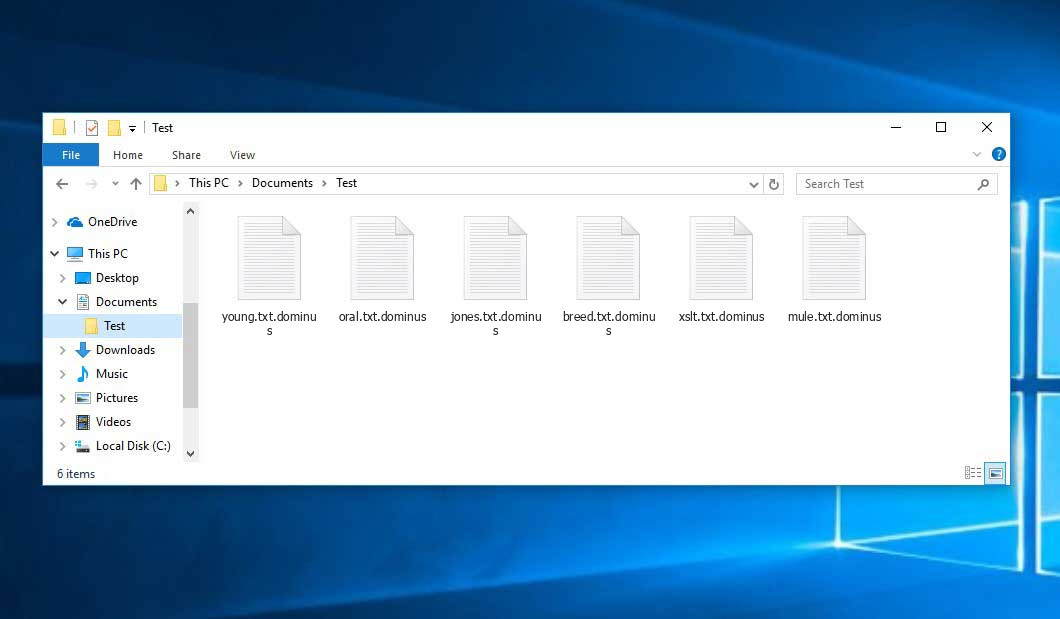
An example of encrypted .dominus files.
How did Dominus ransomware end up on my PC?
There is a huge number of possible ways of ransomware injection.
Nowadays, there are three most popular ways for tamperers to have ransomware working in your digital environment. These are email spam, Trojan injection and peer-to-peer file transfer.
- Another option for ransom hunters is a Trojan horse model. A Trojan is an object that gets into your computer pretending to be something different. For example, you download an installer for some program you need or an update for some software. But what is unpacked reveals itself a harmful agent that encrypts your data. Since the update package can have any name and any icon, you have to make sure that you can trust the source of the stuff you’re downloading. The best thing is to use the software developers’ official websites.
- As for the peer file transfer protocols like BitTorrent or eMule, the danger is that they are even more trust-based than the rest of the Internet. You can never guess what you download until you get it. Our suggestion is that you use trustworthy resources. Also, it is a good idea to scan the folder containing the downloaded items with the anti-malware utility as soon as the downloading is finished.
How to remove ransomware?
It is crucial to inform you that besides encrypting your data, the Dominus virus will probably deploy Vidar Stealer on your PC to get access to credentials to various accounts (including cryptocurrency wallets). The mentioned spyware can derive your credentials from your browser’s auto-filling data.
How сan I avoid ransomware infection?
Dominus ransomware doesn’t have a endless power, so as any similar malware.
You can defend yourself from ransomware attack within several easy steps:
- Ignore any emails from unknown mailboxes with unknown addresses, or with content that has likely no connection to something you are waiting for (how can you win in a money prize draw without participating in it?). If the email subject is more or less something you are waiting for, scrutinize all elements of the suspicious email with caution. A hoax letter will surely contain a mistake.
- Avoid using cracked or untrusted software. Trojan viruses are often distributed as an element of cracked products, possibly as a “patch” preventing the license check. Understandably, untrusted programs are very hard to distinguish from trustworthy ones, because trojans may also have the functionality you need. You can try to find information about this software product on the anti-malware forums, but the best solution is not to use such programs at all.
FAQ
🤔 How can I open “.dominus” files?Are the “.dominus” files accessible?
There’s no way to do it, unless the files “.dominus” files are decrypted.
🤔 I really need to decrypt those “.dominus” files ASAP. How can I do that?
Hopefully, you have made a copy of those important files. If not, there is still a function of System Restore but it needs a Restore Point to be previously saved. The rest of the methods require patience.
🤔 What actions should I take if the Dominus virus has blocked my computer and I can’t get the activation key.
🤔 What can I do right now?
Some of the blocked files can be found elsewhere.
- If you exchanged your critical files via email, you could still download them from your online mailbox.
- You might have shared photographs or videos with your friends or family members. Just ask them to give those images back to you.
- If you have initially got any of your files from the Internet, you can try to do it again.
- Your messengers, social media pages, and cloud storage might have all those files as well.
- It might be that you still have the needed files on your old computer, a laptop, phone, memory stick, etc.
HINT: You can employ data recovery utilities1 to retrieve your lost information since ransomware arrests the copies of your files, removing the original ones. In the tutorial below, you can learn how to recover your files with PhotoRec, but remember: you won’t be able to do it before you kill the virus with an antivirus program.
I need your help to share this article.
It is your turn to help other people. I have written this guide to help users like you. You can use the buttons below to share this on your favorite social media Facebook, Twitter, or Reddit.
Brendan SmithReferences
- Here’s the list of Best Data Recovery Software Of 2024.


Leave a Comment