
The Darkness virus falls within the ransomware type of infection. Harmful software of this type encrypts all the data on your computer (photos, text files, excel tables, audio files, videos, etc) and adds its specific extension to every file, leaving the INFO-DECRYPT.txt text files in each directory which contains the encrypted files.
What is Darkness virus?
The scheme of renaming is the following: .Darkness. As a part of encryption, a file named, for example, “report.docx” will be renamed to “report.docx.[1f34199].Darkness”.
In each directory with the encrypted files, a INFO-DECRYPT.txt text document will be found. It is a ransom money note. Therein you can find information about the ways of contacting the racketeers and some other remarks. The ransom note usually contains a description of how to buy the decryption tool from the tamperers. You can get this decrypting software after contacting [email protected], [email protected] via email. That is basically the scheme of the malefaction.
Darkness Summary:
| Name | Darkness Virus |
| Extension | .Darkness |
| Ransomware note | INFO-DECRYPT.txt |
| Contact | [email protected], [email protected] |
| Detection | Trojan:Win32/Tnega!MSR Removal, Win32:Adware-DNA [Adw] Virus Removal, Win32:Secat [Trj] Virus Removal |
| Symptoms | Your files (photos, videos, documents) have a .Darkness extension and you can’t open them. |
| Fix Tool | See If Your System Has Been Affected by Darkness virus |
The INFO-DECRYPT.txt file accompanying the Darkness malware provides the following frustrating information:
!!!Your files have been encrypted!!!
To recover them, please contact us via email
Write the ID in the email
Email:[email protected]
Second Email:[email protected]
To ensure decryption you can send 1-2 files (less than 1MB) we will decrypt it for free.
IF 48 HOURS PASS WITHOUT YOUR ATTENTION, BRACE YOURSELF FOR A DOUBLED PRICE.
WE DON\'T PLAY AROUND HERE, TAKE THE HOURS SERIOUSLY.
In the image below, you can see what a directory with files encrypted by the Darkness looks like. Each filename has the “.Darkness” extension added to it.
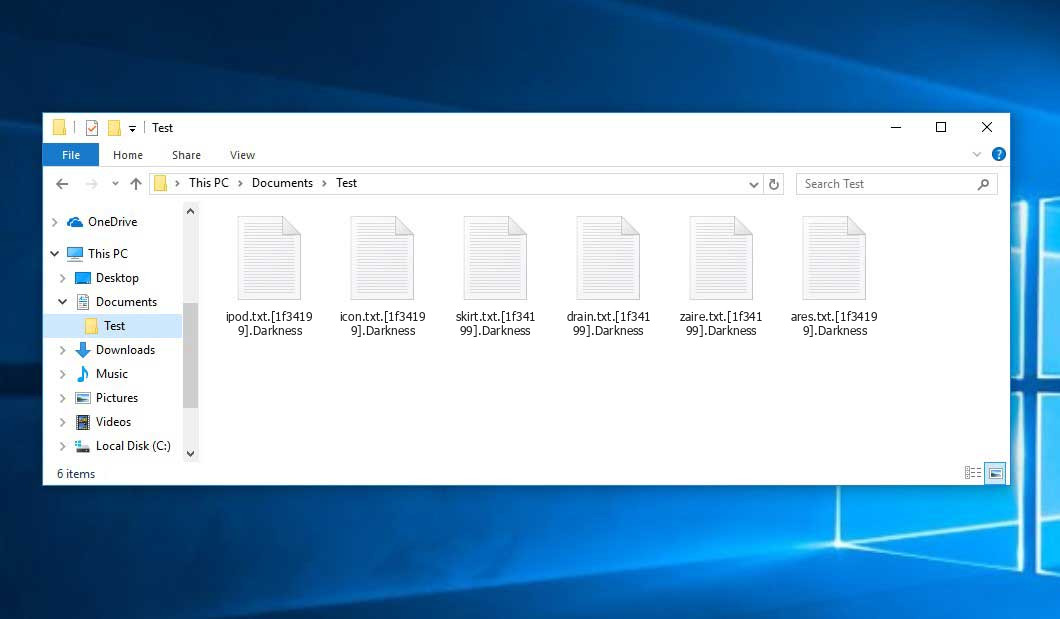
An example of encrypted .Darkness files.
How did my machine catch Darkness ransomware?
There are many possible ways of ransomware injection.
Nowadays, there are three most popular ways for hackers to have ransomware acting in your system. These are email spam, Trojan introduction and peer-to-peer networks.
- If you access your mailbox and see emails that look just like notifications from utility services companies, delivery agencies like FedEx, web-access providers, and whatnot, but whose sender is strange to you, beware of opening those letters. They are most likely to have a viral file attached to them. So it is even riskier to open any attachments that come with letters like these.
- Another option for ransom hunters is a Trojan horse model. A Trojan is a program that infiltrates into your computer pretending to be something else. For example, you download an installer of some program you want or an update for some service. But what is unboxed turns out to be a harmful program that encrypts your data. As the update package can have any name and any icon, you’d better be sure that you can trust the resource of the things you’re downloading. The best way is to trust the software companies’ official websites.
- As for the peer file transfer protocols like torrents or eMule, the threat is that they are even more trust-based than the rest of the Web. You can never know what you download until you get it. Our suggestion is that you use trustworthy resources. Also, it is reasonable to scan the folder containing the downloaded objects with the antivirus as soon as the downloading is done.
How do I get rid of ransomware?
It is important to note that besides encrypting your data, the Darkness virus will probably install Vidar Stealer on your computer to get access to credentials to various accounts (including cryptocurrency wallets). The mentioned program can derive your credentials from your browser’s auto-filling data.
How сan I avert ransomware attack?
Darkness ransomware doesn’t have a endless power, neither does any similar malware.
You can armour your PC from its infiltration in three easy steps:
- Never open any emails from unknown senders with unknown addresses, or with content that has likely no connection to something you are waiting for (how can you win in a lottery without even taking part in it?). In case the email subject is likely something you are waiting for, check all elements of the dubious letter carefully. A hoax email will always have mistakes.
- Do not use cracked or untrusted software. Trojan viruses are often distributed as a part of cracked software, possibly under the guise of “patch” preventing the license check. But untrusted programs are difficult to tell from trustworthy software, because trojans sometimes have the functionality you seek. You can try to find information on this software product on the anti-malware forums, but the best way is not to use such programs at all.
Frequently Asked Questions
🤔 Can I somehow access “.Darkness” files?
Negative. That is why ransomware is so frustrating. Until you decode the “.Darkness” files you will not be able to access them.
🤔 I really need to decrypt those “.Darkness” files ASAP. How can I do that?
It’s good if you have fаr-sightedly saved copies of these important files elsewhere. If not, there is still a function of System Restore but it needs a Restore Point to be previously saved. There are other ways to beat ransomware, but they take time.
🤔 What should I do if the Darkness ransomware has blocked my computer and I can’t get the activation key.
🤔 What can I do right now?
Many of the encoded files might still be within your reach
- If you sent or received your important files through email, you could still download them from your online mailbox.
- You might have shared photographs or videos with your friends or family members. Simply ask them to send those pictures back to you.
- If you have initially got any of your files from the Web, you can try downloading them again.
- Your messengers, social media pages, and cloud storage might have all those files as well.
- Maybe you still have the needed files on your old PC, a notebook, phone, memory stick, etc.
HINT: You can use file recovery programs1 to retrieve your lost information since ransomware encrypts the copies of your files, removing the authentic ones. In the video below, you can see how to recover your files with PhotoRec, but be advised: you can do it only after you kill the ransomware itself with an anti-malware program.
I need your help to share this article.
It is your turn to help other people. I have written this article to help people like you. You can use the buttons below to share this on your favorite social media Facebook, Twitter, or Reddit.
Brendan SmithReferences
- Here’s the list of Best Data Recovery Software Of 2024.


Leave a Comment