
Vile ransomware is a file-encrypting threat that blocks access to documents, photos, archives, databases, and other personal or business files. After encryption, victims are left with renamed files that use the .vile extension and a ransom note named VILE_README.txt.
This guide explains how to identify the Vile infection, what the encrypted filenames and ransom note usually mean, how to remove the active malware, and which file recovery options are safer than paying the attackers.
Vile ransomware overview
Vile is designed to make files unusable and then pressure the victim into contacting the operators for a paid decryptor. Removing the malware is important because it can continue running in the background, encrypt new files, or arrive with additional threats such as password stealers or remote-access tools.
| Name | Vile ransomware |
| Encrypted file extension | .vile |
| Ransom note | VILE_README.txt |
| Ransom demand | $1,500 |
| Symptoms | Files no longer open, filenames are changed, and the .vile extension appears. |
| Main risk | Permanent data loss, credential theft, repeated encryption, and pressure to pay criminals. |
| Recommended first step | Disconnect the device from the network, preserve the ransom note, and remove the active malware before attempting recovery. |
Encrypted .vile files
Vile changes filenames during encryption. For example, a file named photo.jpg may become photo.jpg.vile. The extension is a marker added by the ransomware; renaming the file back does not decrypt the content.
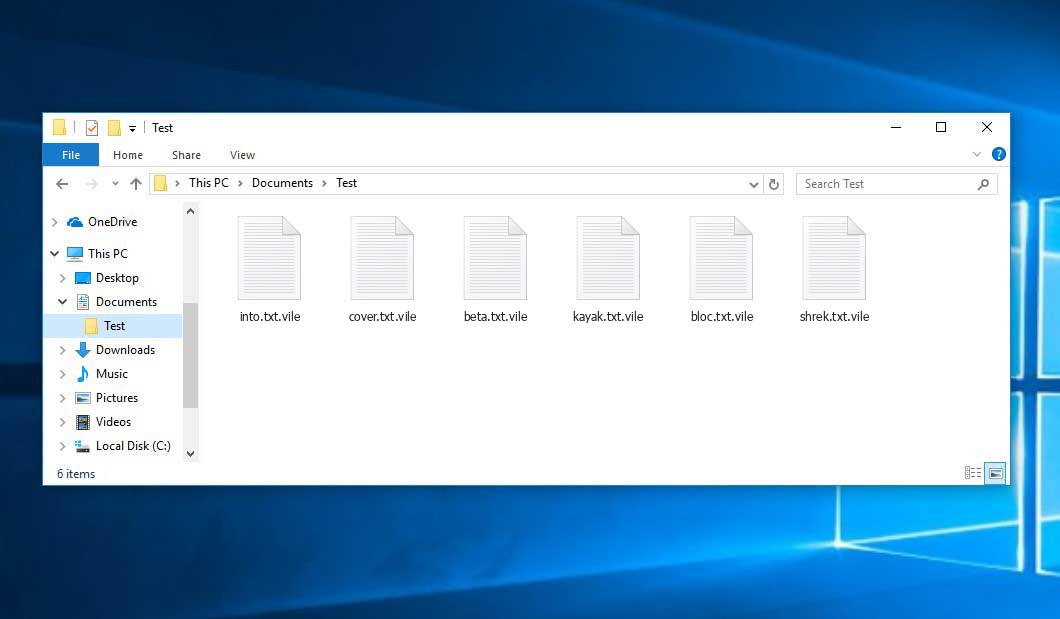
Example of files encrypted by Vile ransomware.
Ransom note
The VILE_README.txt note is used to explain the attackers’ payment instructions and contact method. Keep a copy of it for identification, but do not use it as proof that payment will restore files.
=====================================================================
YOUR FILES HAVE BEEN ENCRYPTED
=====================================================================
Oooops! your computer is now under the control of the vile collective.

All data has been encrypted using an unbreakable

offshore servers, your files are permanently inaccessible.

=====================================================================
ENCRYPTION SUMMARY
=====================================================================

File encrypted: 183
Total size: 151.78 MB
Victim ID: XXXX
Time: XXXX

=====================================================================
WHAT HAPPENED?
=====================================================================
All your files are have been encrypted with military-grade encryption.

The encryption key has been sent to our secure server. Without it, your files cannot be recovered.

Backups have been destroyed.

Recovery tools have been disabled.
=====================================================================
HOW TO RECOVER YOUR FILES
=====================================================================
1. Contact us using the information below

2. Provide your Victim ID

3. Wait for further instructions
=====================================================================
PAYMENT
=====================================================================
Amount: $1,500 USD
BTC: bc1q9mgz97m0j4vtutjqq966vmj785tsr38nvafwxm
XMR: 4AQ9VGowYXNdowUeSCGFLFV7inyRuRRfxBQQSDurBsSi8j7FJNANJY917P1CmvE8cFbVJ5Gx99rYX7SoSjDQkzbH34P8Xf4
=====================================================================
DEADLINE
=====================================================================
Public data publication will happen after 14 days

=====================================================================
CONTACT
=====================================================================
WARNINGS
=====================================================================

DO NOT:

Attempt to decrypt files yourself

Rename or modify encrypted files

Use third-party recovery tools

Run system restore

Reinstall Windows

Any attempt to modify, recover, or remove this application will result in the PERMANENT DESTRUCTION of your decryption key

If you do not cooperate before the deadline, your files will remain locked and your private data will be published for everyone to see.

Do not turn off, restart, or unplug this computer — doing so may permanently damage your files.

If you attempt to power down, the decryption key will be destroyed.
=====================================================================
Should you pay the ransom?
Paying is risky and should not be treated as a normal recovery method. Attackers may ignore the victim after payment, send a broken decryptor, demand more money, or reuse the same access later. Payment also does not remove the malware from the computer.
Before considering any payment, identify the ransomware, preserve encrypted files, check reputable decryptor sources, and make sure the infected system is clean. In many cases, backups, shadow copies, cloud sync history, email attachments, or data recovery tools are safer paths to partial recovery.
How Vile ransomware infects computers
Ransomware normally reaches a computer through a small number of practical routes. The exact entry point can vary, but the most common sources are malicious email attachments, fake software updates, cracked programs, trojanized installers, exposed remote access, and downloads from untrusted file-sharing sites.
- Email attachments and links: fake invoices, delivery notices, job documents, or urgent account messages can hide a malicious file or script.
- Cracked software and keygens: attackers often bundle ransomware loaders with pirated installers and license bypass tools.
- Fake updates: pages that claim a browser, codec, driver, or security component is outdated may deliver malware instead.
- Remote access abuse: weak RDP, reused passwords, exposed admin panels, or stolen credentials can let attackers run ransomware manually.
- Other malware: trojans and botnets can install ransomware after the first infection.
How to remove Vile ransomware
Do not start recovery by editing encrypted files. First stop the active infection, then work on copies of the encrypted data.
- Disconnect the device. Unplug Ethernet, turn off Wi-Fi, and disconnect shared drives to reduce further encryption.
- Preserve evidence. Save the ransom note, a few encrypted file samples, suspicious filenames, and any contact addresses shown by the attackers.
- Boot into a safer state if needed. If the ransomware blocks normal work, use Safe Mode or a trusted rescue environment.
- Scan the system. Use a reputable anti-malware tool to remove the active ransomware and any secondary payloads.
- Restart and scan again. A second scan helps confirm that no loader, stealer, or scheduled task remains.
- Only then attempt recovery. Restore from clean backups or work on copies of encrypted files.
How to recover files encrypted by Vile
Removing Vile stops the active malware, but it does not automatically decrypt files. File recovery depends on the ransomware family, the encryption method, backup availability, and whether a public decryptor exists.
Check for a public decryptor
Search by the ransomware name, extension, ransom note filename, and contact address. Use only reputable security vendors, No More Ransom, or well-known malware research sources. Avoid random “decryptor” downloads from forums or file-hosting sites.
Use backups and sync history
Restore from offline backups, external drives that were not connected during the attack, cloud version history, email attachments, messenger file history, or older devices that still contain copies.
Try data recovery tools carefully
Some ransomware deletes original files after creating encrypted copies. In that case, file recovery software may help recover deleted originals, especially if you stop using the disk quickly. Install recovery tools on another drive and recover files to separate storage.
Avoid damaging the evidence
Do not bulk rename encrypted files, run random decryptors, or modify file headers. Keep at least a small archive of encrypted samples and the ransom note in case a working decryptor becomes available later.
How to reduce the risk of another ransomware attack
- Keep offline or immutable backups and test restores regularly.
- Patch Windows, browsers, Office, VPN clients, remote-access tools, and server software.
- Disable exposed RDP or protect it with VPN, MFA, and strong unique passwords.
- Do not use cracked software, keygens, or unofficial installers.
- Limit admin rights for daily accounts.
- Use email filtering and block risky attachment types where possible.
- Keep security software active and review alerts instead of dismissing them.
FAQ
Can I open .vile files by renaming them?
No. The extension is only a visible marker. The file content is encrypted, so renaming the file back to its original extension will not restore it.
Will removing Vile decrypt my files?
No. Removal stops the active infection and prevents additional damage. Decryption or recovery is a separate step that depends on backups, public decryptors, or recoverable deleted originals.
Is there a free Vile decryptor?
There may or may not be one. Check reputable decryptor collections and security vendor advisories using the ransomware name, extension, ransom note, and contact address. If no decryptor exists today, keep encrypted samples because one may appear later.
No. Encrypted documents are not malware by themselves. A malware scanner should remove the active malicious files, loaders, and related threats, while leaving encrypted personal files in place.
What should I do first if Vile is still encrypting files?
Disconnect the computer from the network, unplug shared drives, stop using the device, and scan from a safe environment. After the system is clean, work on recovery from copies rather than the only originals.


Leave a Comment