
TheJewelryShop.com operates as a deceptive site that you should avoid in any possible way. It states to sell various items at very low prices. In fact, it is a fraudulent site that will either send you a fake, substandard goods, or nothing at all.
Is TheJewelryShop.com a Scam?
Considering the issues I found, it is obvious that TheJewelryShop.com is an phishy and scam online platform. There is no proof supporting its authenticity or trustworthiness in delivering genuine items to customers.
Customers who have shopped on TheJewelryShop.com have reported failure to receive of orders or receipt of different and lower quality products. Additionally, attempts to reach out to TheJewelryShop.com for refunds or exchanges have been futile due to an invalid or unresponsive email address.
Hence, we recommend you to refrain from shopping on TheJewelryShop.com or similar websites that display these warning signs. Engaging with such sites poses the risk of financial loss and personal info exposure to crooks who prioritize neither consumer happiness nor safety.
| Website | TheJewelryShop.com |
| Hosting | AS13335 Cloudflare, Inc. Canada, Ottawa |
| IP Address | 23.227.38.32 |
| Threat Type | Scam/Fraud |
| Scam Type | Fraudulent/Scam online shop |
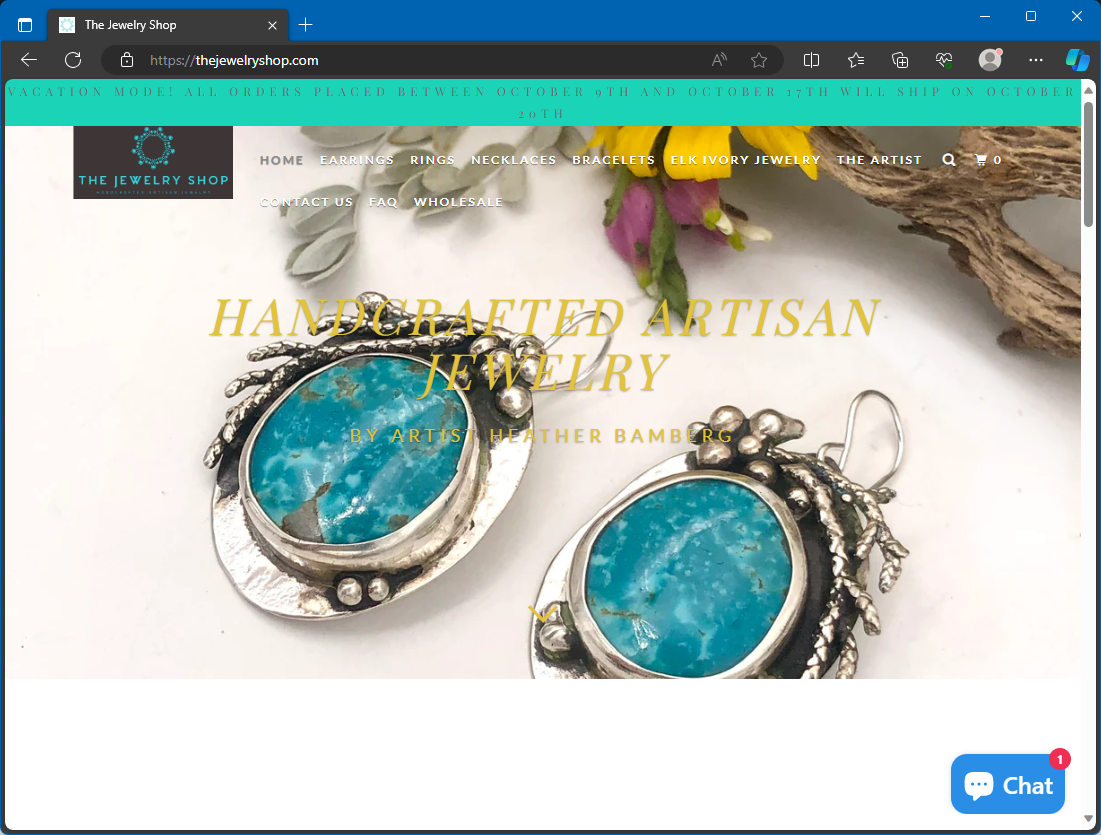
TheJewelryShop.com Scam
Why TheJewelryShop.com is a Scam?
TheJewelryShop.com clearly exhibits numerous red flags that show its unlawfulness. Our complete review aims to provide insights into all the crucial details you should be aware of regarding this particular internet shop. Through a careful examination, we have made the following discoveries:
- First and foremost, TheJewelryShop.com shop just recently created its online platform. This is a typical trait of scam pages that disappear quickly.
- Secondly, the non-existence of ways to reach out on the site raises worries. Users can only get in touch through email, without a telephone number, physical address, or instant messaging option. This shortage of options makes it hard to resolve problems or queries.
- Thirdly, TheJewelryShop.com provides fake business information, offering no genuine data about the organization behind the website.
- Furthermore, TheJewelryShop.com entices customers with unrealistic price cuts and promotions. It cuts prices by over 70% or even 90%, aiming to attract unsuspecting users into purchasing low-quality or fake products.
- In addition, the company plagiarizes material and item pictures from legitimate e-commerce platforms such as Alibaba, Amazon, and Aliexpress. This shortage of originality and credibility aims to deceive shoppers with fake products.
- Moreover, despite stating to provide trendy and stylish items, TheJewelryShop.com lacks any media presence or links to social media platforms. This absence is out of the ordinary for an internet shop and suggests a shortage of openness, customer engagement, and trust-building efforts.
- Lastly, the site has no real client testimonials. Users indicate late or absent deliveries, inferior customer support, defective or wrong products, repayment difficulties, and illegitimate charges on debit cards.
What should I do if I have shopped on TheJewelryShop.com?
If you have made a purchase on TheJewelryShop.com, it is suggested strongly to take the following steps:
- Contact your financial institution without delay if you paid with a payment card. Demand them to cancel the purchase and begin a refund. Furthermore, flag TheJewelryShop.com as a deceptive platform and insist them to prevent subsequent billing from it.
- Change your security credentials as soon as possible, particularly if you have created an account on TheJewelryShop.com and used the same password as on other web profiles. Think about enabling two-factor verification for enhanced security against cybercriminals seeking to gain access to your profiles and abscond with personal details.
- Be vigilant of phishing messages. You may get messages from TheJewelryShop.com or other sources associated with your order, offering discounts or repayments. Treat these messages as phishing attempts and stay clear of clicking on any suspicious links or downloading attachments that may hold malware. Delete such emails immediately.
- To prevent malicious ads, Trojans, phishing attempts, and other unwanted elements that may not be prevented by antivirus software alone, use a browser-based ad blocker like AdGuard.
How to Remove Malware from Your PC?
Frequently Asked Questions about the TheJewelryShop.com Scam
- Contact your bank or card provider and ask about chargeback options.
- Save screenshots, receipts, tracking numbers, and emails as evidence.
- Change reused passwords and enable two-factor authentication on important accounts.
- Watch for follow-up phishing emails pretending to offer refunds or delivery updates.

